Watermark Videos Online
Add text or logo watermarks to your videos directly in the browser. Supports MP4, AVI, MOV, MKV, FLV, WMV, 3GP, MPG, and M4V — no desktop software needed.
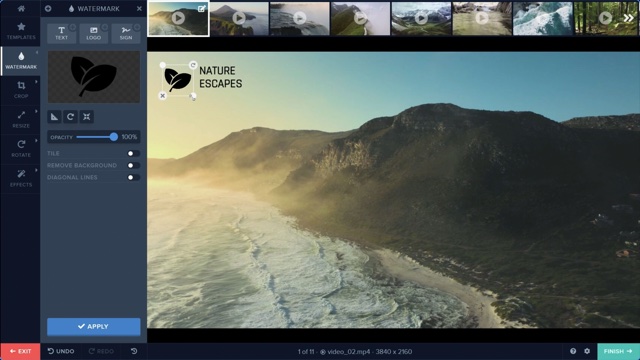
Most online watermark tools only handle images — Watermark.ws is one of the few that lets you watermark videos directly in your browser. Upload your video files in formats like MP4, AVI, MOV, MKV, FLV, WMV, 3GP, MPG, and M4V, add a custom text or logo watermark, preview the result, and export. No software downloads, no complicated timelines.
See exactly how your watermark looks on your video before committing to an export. Adjust placement, size, and opacity in real time so you never waste time re-processing.
Place your watermark anywhere on the video frame. Drag it to the exact position you want, resize it, and fine-tune opacity to balance visibility with a clean viewing experience.
Watermark your videos from any device with a modern browser. There is no software to install, no plugins to manage, and no file size surprises — just upload, watermark, and download.
How It Works
Get started in minutes — no download required.
Step 1
Upload Your Video
Drag and drop your video file or browse to select it. Watermark.ws supports MP4, AVI, MOV, MKV, FLV, WMV, 3GP, MPG, and M4V formats.
Step 2
Add & Position Your Watermark
Choose a text or logo watermark, customize the font, color, size, and opacity, then drag it to your preferred position on the video frame. Preview the result before exporting.
Step 3
Export & Download
Hit export and your watermarked video will be ready to download in moments. Share it on social media, your website, or with clients — fully branded and protected.
Frequently Asked Questions
What video formats does Watermark.ws support?
Watermark.ws supports MP4, AVI, MOV, MKV, FLV, WMV, 3GP, MPG, and M4V. You can upload videos in any of these formats and export with your watermark applied.
Can I preview the watermark on my video before exporting?
Yes. Watermark.ws lets you preview your watermark placement and appearance on the video before you export. This way you can adjust positioning, size, and opacity until you are satisfied with the result.
Is video watermarking really done in the browser?
Yes. Watermark.ws processes your video watermark online — no desktop software to install. Upload your file, design your watermark, and download the finished video, all from your browser.
Can I add my logo to a video?
Absolutely. Upload your logo as a PNG (transparent backgrounds work best), position it on the video frame, and adjust its size and opacity. Your logo will appear consistently throughout the entire video.
More File Type Pages
What Our Customers Say
Watermark.ws is trusted by thousands of professionals and businesses

There is nothing better than Watermark.ws! It can easily batch process hundreds of files while watermarking, resizing, and re-touching them simultaneously.
Michael Archambault
Apple

We use Watermark for adding credits to photos and videos from news agencies before we share them on Twitter.
Sarah Marshall
The Wall Street Journal

It's super easy to use. You can customize your watermark and even use your own company logo. The customer service is excellent and all of my questions have been answered.
Alice Delore
SaleHoo
Brand and Protect Your Videos
Add a professional watermark to any video file in minutes — right from your browser. No software to install, no account required to start.
© Watermark.ws by Much Media Inc
Made in Canada