Watermark Videos Online
Protect your video content the same way you protect your photos. Upload your video, add a text or logo watermark, and download the result — all from your browser, no editing software required.
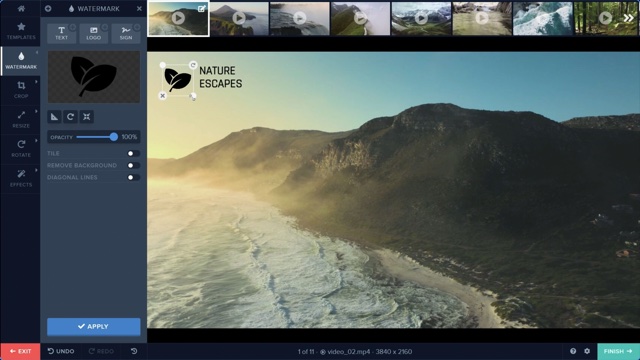
Video content is even easier to steal than photos — a single download or screen recording and your work is someone else's. Watermarking your videos adds a persistent visual layer of ownership that travels with the file no matter where it ends up. Watermark.ws processes videos directly in your browser so you can add your watermark and download the result without installing any video editing software.
Upload MP4, MOV, AVI, and other common video formats. Watermark.ws processes them directly in your browser and exports a watermarked version ready to share or upload anywhere.
Your watermark appears on every frame of the video from start to finish. Whether someone watches the first second or the last, your ownership mark is always visible.
Place your watermark in any corner, along the bottom, or centered across the frame. Adjust the size and opacity so it protects your content without distracting from the viewing experience.
How It Works — In 3 Simple Steps
Protect your video content without any editing software.

Upload Your Video
Drag and drop your video file or browse to select it. Watermark.ws supports MP4, MOV, AVI, and other common formats — all processed in your browser.

Add Your Watermark
Choose a text watermark or upload your logo. Position it on the video frame, set the size and opacity, and preview how it will look during playback.

Process and Download
Click apply and your watermark renders across every frame of the video. Download the finished file ready for YouTube, social media, or your website.
Your Videos Deserve Protection Too
Add your watermark to any video — directly in your browser.
Frequently Asked Questions
What video formats can I watermark?
Watermark.ws supports MP4, MOV, AVI, and other common video formats. MP4 is the most widely used and recommended format for best compatibility when sharing online.
Will the watermark appear on the entire video?
Yes. The watermark is applied to every frame of the video, so it is visible from the first second to the last. There is no way for someone to skip past it or crop it out of a single frame.
Does watermarking reduce my video quality?
Watermark.ws preserves the quality of your original video as much as possible during processing. The watermark is added as an overlay without re-encoding at a lower bitrate, keeping your video looking sharp.
Can I watermark multiple videos at once?
Yes. You can upload and watermark multiple video files in a single session. Apply the same watermark across all of them and download each one when processing is complete.
More Guide Pages
What Our Customers Say
Watermark.ws is trusted by thousands of professionals and businesses

There is nothing better than Watermark.ws! It can easily batch process hundreds of files while watermarking, resizing, and re-touching them simultaneously.
Michael Archambault
Apple

We use Watermark for adding credits to photos and videos from news agencies before we share them on Twitter.
Sarah Marshall
The Wall Street Journal

It's super easy to use. You can customize your watermark and even use your own company logo. The customer service is excellent and all of my questions have been answered.
Alice Delore
SaleHoo
Protect Your Videos Before You Share Them
Add your watermark to any video in minutes. No editing software needed — just your browser and your content.
© Watermark.ws by Much Media Inc
Made in Canada