How to Add an Icon to a Name Watermark
Put a camera, a leaf, a paw print or your own logo with your name, from the watermark maker’s icons.
- No account needed to start
- Up to 5,000 files per batch

In short
In the watermark maker, click Icon beside your name and pick one of 205 icons, by topic or by search, or upload your own logo under Your logo. Designs on the Icon shelf are built around it, and Icon color keeps its own colors or matches your text.
How to Add an Icon to Your Watermark in 5 Steps
Your name and one small picture, in a couple of minutes.
-
Step 1: Type Your Name
Open the watermark maker and type your name or business in Name. Add a Tagline such as Photography if you want a second line.

-
Step 2: Choose an Icon
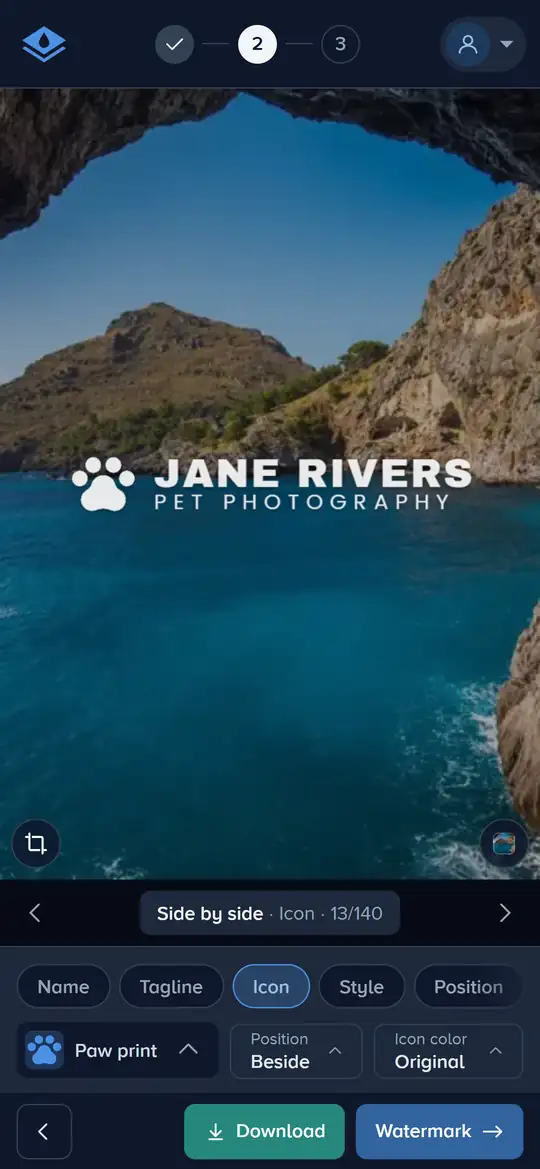
Click the Icon field. Under Or pick an icon, choose a topic such as Photo, Nature or Animals, or search, and click an icon. On a phone, tap the Icon square beside your name, pick one, then tap Done.

-
Step 3: Or Use Your Own Logo
Under Your logo, click Upload your logo or drop the file on it. A logo on white has the white taken out by itself, marked Auto; switch Remove background off to keep it.

-
Step 4: Pick a Design With an Icon
Open the Icon shelf, with designs such as Studio, Side by side and Emblem. In some, the Icon setting puts it Above or Beside your name, or Off; in all of them Icon color is Original or Match text.

-
Step 5: Download or Use It on Your Photos
Click Download for a transparent PNG or SVG, or the blue Watermark button after it to put it on your photos.

If It Doesn’t Look Right
The Icon Doesn’t Show
Not every design draws one. Open the Icon shelf, or pick a design whose tile shows ICON in its corner; the others leave it out.
The Colors Clash
Set Icon color to Match text. The icon takes your watermark’s color, so name and icon read as one piece, and both change together when you pick a new color.
Your Logo Sits in a White Box
Switch on Remove background under your logo and raise Fuzz until the box is gone. It only takes out white; a logo on a colored background needs a transparent PNG.
Your File Is Refused
The maker could not read it as a picture. Save the logo as a PNG, JPG or SVG and upload that instead.
Make a Name Watermark With an Icon
Type your name, pick an icon or upload your logo, and download it for free.
Add an icon- No account needed to start
- Works in your browser
Questions people ask
How many icons are there?
Can the icon go above my name instead of beside it?
Are the icons free?
Can I go back to my logo after trying icons?
Keep reading
 Guide
Add a Logo Watermark to Your Photos
Upload your logo, set its size, opacity and position, and put it on one photo or a whole shoot. PNG, SVG or JPG logos up to 50 MB and 8,000 px. Free to try.
Guide
How to Add a Logo to a Video
Upload your logo, set its size and opacity, place it on the video’s frame and download the video with your logo on it. PNG, SVG or JPG logos up to 50 MB.
Guide
How to Add a Text Watermark to Photos
Type your name, website or © line, pick a font, then set its size, color, opacity and place. Apply it to one photo or a whole batch and download them.
Guide
How to Apply an Edit Only to the Photos You Changed
Open the photos that need an edit, then click Apply and pick Edited files. Only those photos get the watermark or crop; the rest of the batch stays as it is.
Guide
How to Batch Watermark Multiple PDFs at Once
Watermark many PDFs in one edit: place the watermark once, apply it to all files, and download them together. Up to 5,000 files per edit on Premium.
 Guide
How to Batch Watermark Photos Online
Batch watermark up to 5,000 photos in one batch: design the watermark once, apply it to all, fix single photos and download a zip. Free to try, no install.