On this page
- Why Instagram Needs Its Own Watermark Placement
- The Feed Crop: Where Corner Watermarks Disappear
- The Profile Grid Crops It Again
- Carousels: One Shape for Every Slide
- Will a Watermark Hurt Your Instagram?
- Stories and Reels: Stay Out of the Interface
- Size It for a Phone Screen
- Reposts, Screenshots and Credit
- An Instagram Watermarking Workflow in Watermark.ws
Why Instagram Needs Its Own Watermark Placement
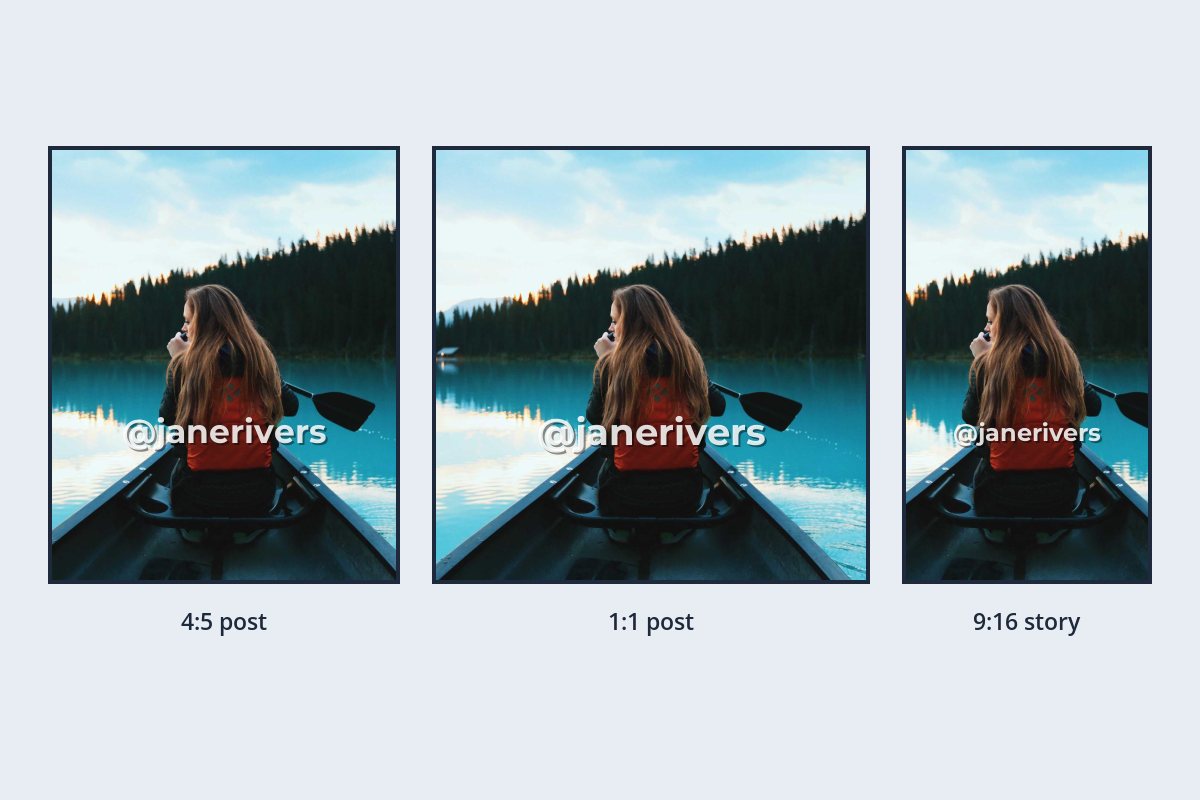
On your own website, a photo is shown the way you exported it. On Instagram, it is reshaped before anyone sees it. A landscape photo is usually cropped to a square or a tall 4:5 frame for the feed. Your profile shows it again as a narrower 3:4 tile. And in Stories and Reels, the app draws your profile name, a progress bar and a reply box over the top and bottom of the picture.
Each of those steps can cut off or cover a watermark that looked fine on your computer. The good news is that they all leave the same area alone: the middle of the frame.
- Crop first, watermark second. Decide on the Instagram shape before you place the watermark.
- Stay inside the centered 3:4 area of your post, so the profile grid cannot trim it.
- In Stories and Reels, keep clear of the top and bottom 14% of the frame, where the app places its own buttons.
- Use your @handle as the text. When your photo is reposted, it tells people exactly where to find you.
The Feed Crop: Where Corner Watermarks Disappear
Instagram accepts wide landscape photos, but they appear small in a vertical feed, so most photographers crop to a square (1:1) or a portrait 4:5 frame, which fills far more of a phone screen. That crop comes from the middle of the photo — and a watermark sitting in the corner of the original is usually the first thing to go.
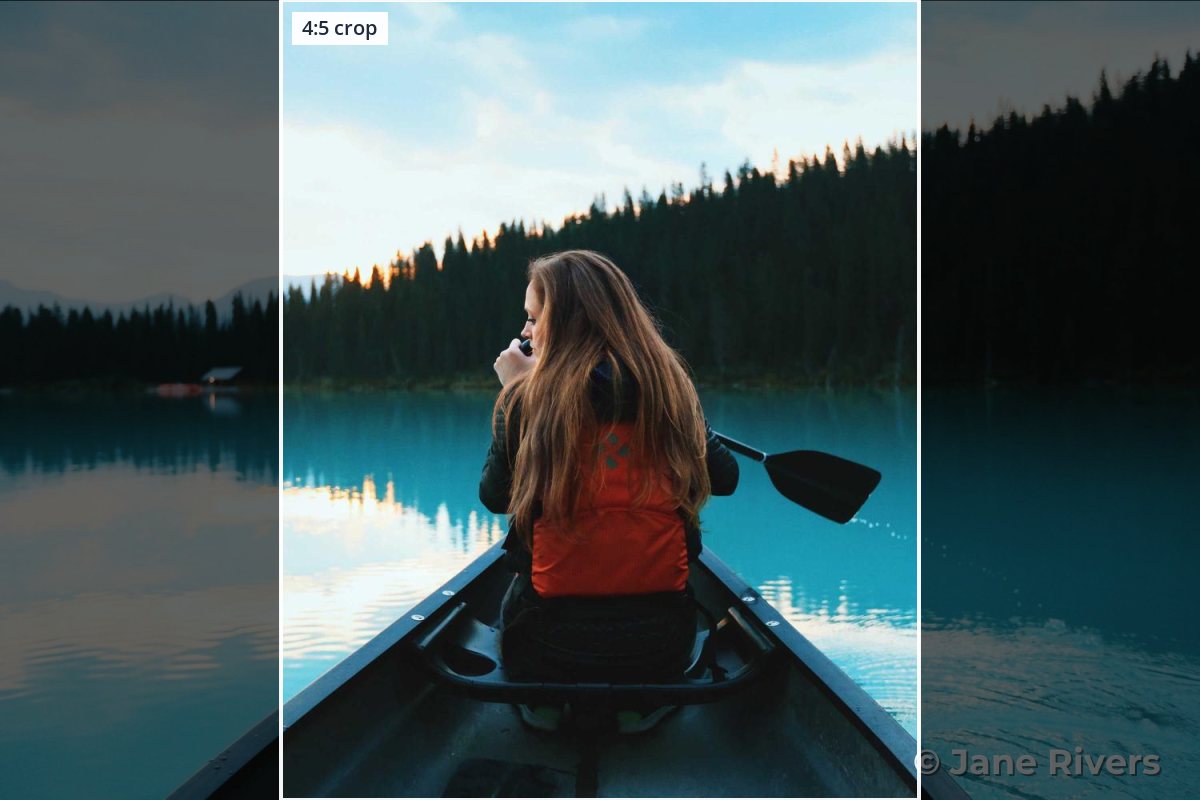
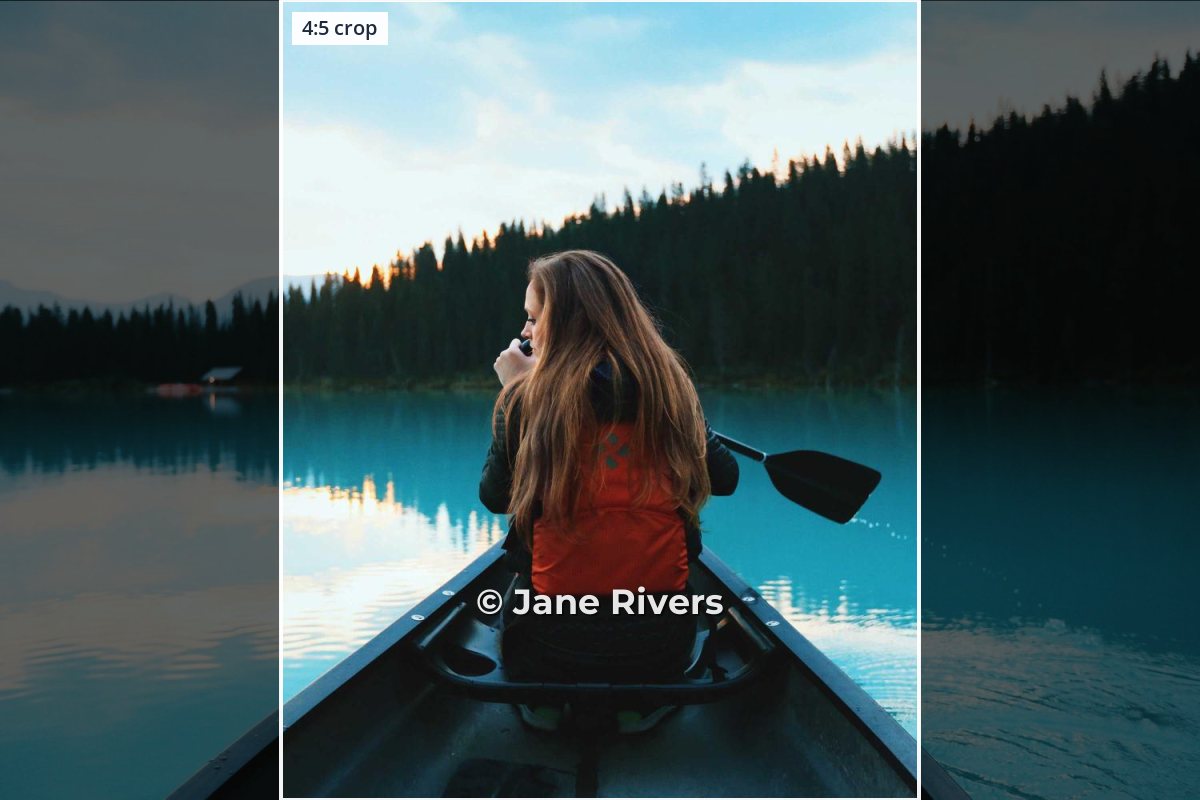
On the left, the watermark was placed on the full landscape photo and ends up in the shaded area that the 4:5 crop throws away. On the right, the same watermark sits on the canoe, inside the crop, where it also overlaps part of the subject — which makes it far harder to crop out later. For more on why that matters, see where to put a watermark on a photo.
The Crop tool has a square 1:1 preset and also takes an exact width and height in pixels, so you can cut a 4:5 frame (for example 1080 × 1350) and then place the watermark on the photo you will actually post.
The Profile Grid Crops It Again
In January 2025, Instagram switched profile grids from square tiles to taller 3:4 tiles. Your post still appears in full in the feed, but on your profile each photo is shown as a centered 3:4 slice. The wider the post, the more is hidden:
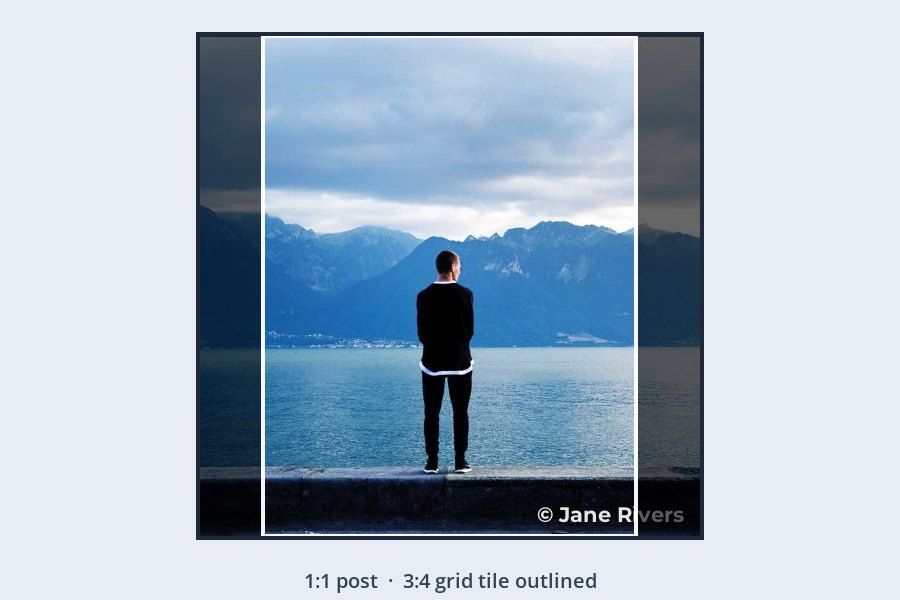
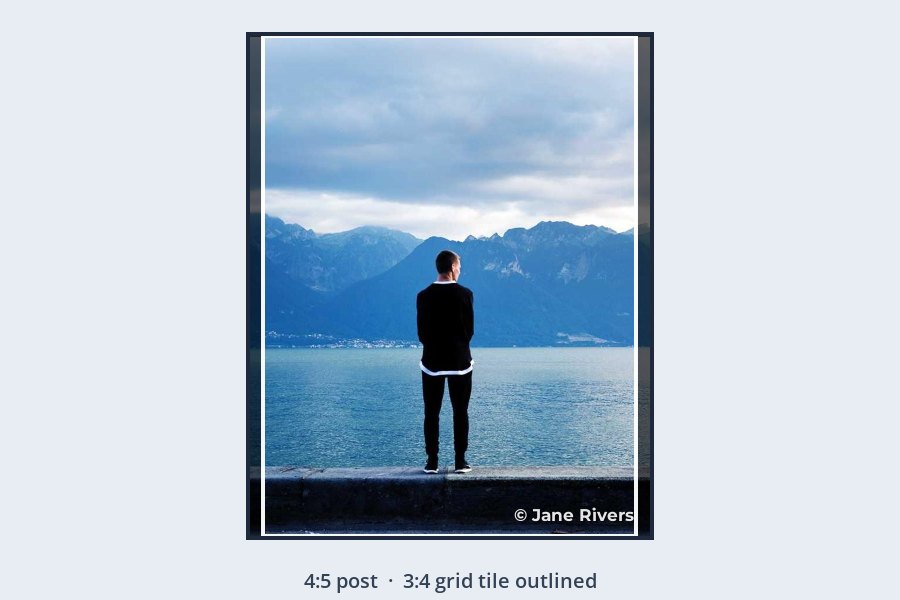
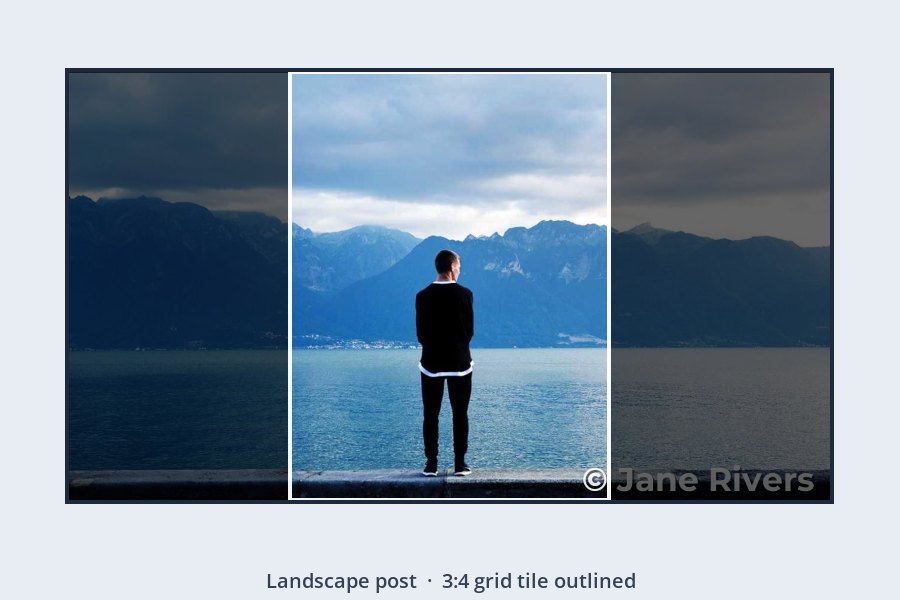
The fix is the same for every shape: keep the watermark inside the centered 3:4 area, and at least a little way in from its edges. A watermark in the lower middle of the frame, or near the subject, is safe in the feed, the grid and when someone shares the post.
Instagram now also accepts 3:4 portrait photos without cropping them. A 3:4 post matches the grid tile exactly, so nothing is trimmed on your profile at all — if you shoot for Instagram first, it is the simplest shape to watermark.
Carousels: One Shape for Every Slide
A carousel can hold up to 20 photos, and Instagram crops every slide to the shape of the first one. If your first slide is a square and the rest are landscape photos, their edges are cut off on upload — along with any watermark placed near them.
- Crop every slide to the same shape before you watermark. Then the watermark lands where you put it on each one.
- Watermark every slide, not just the first. Individual slides are easy to screenshot on their own.
- Keep the watermark in the same spot on each slide. Consistency looks deliberate, and people learn to recognize it.
Because Watermark.ws applies the same crop and watermark to a whole batch, preparing a ten-slide carousel takes the same effort as preparing one photo.
Will a Watermark Hurt Your Instagram?
Some creators worry that watermarks make their feed look less polished. It is a fair concern: a large, heavy mark across every photo does get in the way of the picture, and on Instagram the picture is the whole point.
The answer is not to drop the watermark but to scale it to the risk. For everyday posts, a modest @handle at 60–85% opacity near the subject gives credit without dominating the photo. Save larger, tiled watermarks for images you sell, previews of paid work, or photos that have already been taken without permission.
Use the same font, size and position on every post. A consistent watermark reads as branding, not clutter — and it makes your work recognizable even when it is reposted without a tag.
Stories and Reels: Stay Out of the Interface
Stories and Reels are full-screen 9:16, and the app draws its own interface on top: your name and a progress bar at the top, a reply box and buttons at the bottom. A watermark in either area is partly or completely covered.

Meta’s own guidance for Stories ads is to keep roughly the top and bottom 14% of the frame free of text and logos. That is a sensible rule for any watermark on a story or reel, too: place it in the middle band, and ideally to one side of a face rather than across it.
On Reels, the like, comment and share buttons run down the right-hand side. If your watermark sits in the middle band, keep it centered or toward the left.
Size It for a Phone Screen
Instagram shows feed photos at up to 1080 pixels wide, and most people see them on a phone. A watermark that looks bold on a desktop monitor can be unreadable at that size — thin fonts especially, as the shrink test in the best fonts for watermarks shows.
| Where it appears | Shape | Where to put the watermark |
|---|---|---|
| Feed post, portrait | 4:5 | Inside the centered 3:4 area, lower middle or near the subject. |
| Feed post, square | 1:1 | Inside the centered 3:4 area — not in the corners. |
| Feed post, landscape | Up to 1.91:1 | Close to the middle; the grid shows only a narrow center slice. |
| Stories and Reels | 9:16 | Middle band, clear of the top and bottom 14% and the Reels side buttons. |
| Profile grid tile | 3:4 | Anything inside the centered 3:4 area of the post survives. |
- Use a medium or bold weight. Hairline fonts disappear first when the photo is shrunk.
- Make it a bit bigger than you would on your website — around a quarter to a third of the frame width for a text watermark.
- Keep opacity around 60–85%, with a soft shadow, so it reads on both light and dark parts of the photo.
Reposts, Screenshots and Credit
On Instagram, your photo travels further than your own profile. It gets screenshotted, shared to other people’s stories, and reposted by accounts that do not always tag you. Once it leaves your post, the watermark is the only credit that is guaranteed to go with it.


That is why an @handle often works better than a name on Instagram. Anyone who sees a repost can search for the exact account in seconds, while a common name can lead them to someone else entirely. If your business name and handle differ, the handle is usually the more useful of the two here.
An Instagram Watermarking Workflow in Watermark.ws
-
1
Upload the photos you plan to post
Drag in one photo or a whole shoot.
-
2
Crop to the Instagram shape
Use the 1:1 preset for square posts, or type an exact width and height, such as 1080 × 1350 for 4:5.
-
3
Add your watermark
Type your @handle as a text watermark, or add your logo. The © button inserts a copyright symbol if you want one.
-
4
Place it in the safe middle
Drag it inside the centered 3:4 area. For stories, keep it in the middle band of the frame.
-
5
Save it as a template
Save the batch’s edits — the crop and the watermark — as a template, so every future batch for Instagram looks the same.
-
6
Download and post
Your originals stay untouched, so you can export different versions for your website or clients later.
Posting a lot at once? See how to batch watermark photos.
Sample photos: Canoe by Roberto Nickson, Lake view by Joshua Earle, Portrait by Roksolana Zasiadko, Coffee by Carli Jean on Unsplash.