
On this page
- Why Give a Digital Gift
- Editing Software and Presets
- Backup and Storage
- Courses and Learning
- Print Credit From a Photo Lab
- Portfolio and Client Gallery Hosting
- Protection: A Watermark and a Copyright Fee
- Make Their Watermark Yourself
- Business Tools: Contracts, Invoicing and Scheduling
- How to Give Software
Why Give a Digital Gift
If you search for gifts for photographers, you get lists of lenses, bags, straps and tripods. They are fine gifts if you know exactly what someone shoots with. Most partners, parents and friends do not, and photographers are particular: a lens has to fit their camera's mount, a bag has to fit their kit, and the thing that looks like a great idea is often something they already own.
Digital gifts avoid every one of those problems. Software and services work whatever camera they use, there is nothing to return, and many of them can be emailed on the morning you choose, so there is no shipping cut-off to miss. They also tend to cover the parts of photography people put off: backing up, printing, learning, and the paperwork of getting paid.
- No wrong lens or wrong mount. A course, a print credit or a year of software fits a phone photographer and a pro with three bodies alike.
- Arrives in minutes. A gift code or a scheduled email works on the day itself, which makes these the best last-minute gifts for photographers.
- Check what they already use. Some gifts are tied to an account they already have. One casual question ("Do you edit in Lightroom?") saves buying the wrong thing.
Editing Software and Presets
Editing is where most photographers spend their evenings, so a year of the tool they use is a gift they will notice every day.
1. Adobe's Photography plan. Lightroom and Photoshop together, and the editor a great many photographers already use. Some camera retailers sell it as a prepaid 12-month code; check the code is for the same plan they already pay for, since a code for one Adobe plan does not always extend another.
2. Their next year of a different editor. If they use Capture One or another editor, do not switch them; offer to pay their next year instead. Photographers rarely change editors on someone else's suggestion.
3. A preset pack from a photographer they admire. Presets are saved editing looks, sold as downloads by many working photographers. Before buying, check the seller lets you buy for someone else, so the license is in their name.
Backup and Storage
Ask a photographer how many copies of their photos they have and the honest answer is often "one, on this laptop". Backup is the least exciting gift on the list and the one they will be most grateful for the day a drive fails.
4. A year of cloud backup. Backblaze, for example, has offered gift codes for its Computer Backup plan, which copies the whole computer in the background. Check its site for what it sells now and the current price.
5. More room in the cloud they already use. If their phone is their camera, extra iCloud+ or Google One storage keeps every photo backed up. An Apple Gift Card can pay for iCloud+.
Three copies of every photo, on two kinds of storage, with one copy somewhere else. Cloud backup is usually the "somewhere else" that is missing.
Courses and Learning
6. Skillshare. Has sold gift memberships of several lengths that can be sent on a date you pick. Its catalog includes a large number of photography and editing classes. Check whether the gift renews before you buy.
7. MasterClass. Sells a year's membership as a gift, delivered at once or on a later date. Its photography classes are taught by well-known names such as Annie Leibovitz and Jimmy Chin.
8. A workshop or photo walk near them. Many local photographers and camera clubs run them. It is a booking, not a parcel, so it still counts as nothing to ship, and it gets them out shooting with other people.
Match the gift to where they are. A beginner gets the most from broad classes on light and composition; someone who already sells their work may prefer a class on editing, pricing or a single genre.
Print Credit From a Photo Lab
Many photographers rarely print their own work. A print credit fixes that, and it is a gift with a physical result even though nothing ships to you.
9. An e-gift card from a photo lab. Many labs, Mpix among them, sell e-gift cards emailed to the recipient. Pick a lab that ships to where they live.
10. Their own favorite photo, printed large. Ask which picture they are proudest of, or pick one from their feed, and pay for a proper print or a canvas through their usual lab.

Portfolio and Client Gallery Hosting
Once someone starts taking photos for other people, they need somewhere to show them. These services run on the photographer's own account, so the gift is to pay for the year rather than to buy a code.
11. A year of their portfolio website. Pay for their site on Squarespace, SmugMug, Format or whatever they already use, plus the renewal of their domain name. If they do not have a site yet, see watermarking a portfolio website for what goes on one.
12. A year of client gallery hosting. Pixieset, Pic-Time, ShootProof and similar services are where clients view, download and order their photos. These matter most to people photographing weddings, families and events.
Protection: A Watermark and a Copyright Fee
Photographers who share their work online often find it reposted with no name on it. Two gifts help: one that credits them on every photo, and one that gives them legal teeth if a photo is used commercially.
13. A year of Watermark.ws Premium. Their name or logo on a whole shoot in one edit, up to 5,000 files at a time, saved as a template for the next one. It includes a signature logo in 30 handwriting styles, 600+ fonts plus their own, logo background removal, every page of PDFs and Word files, and the first 30 seconds of every video. Ultimate adds full-length video up to 4 hours. See Watermark.ws for photographers and a batch watermarking workflow.
14. A copyright registration fee. In the US, registering a group of up to 750 photos with the Copyright Office costs $55 at the current fee. The application is made in their name, so the easiest way to give it is to cover the fee and sit with them while they file. Should you register photo copyright? explains who it is worth it for.
Type their name and it becomes the signature watermark on the card. The email goes out on the morning you choose, or print the card yourself. Nothing renews, and the code never expires.
Gift a year, from $48.00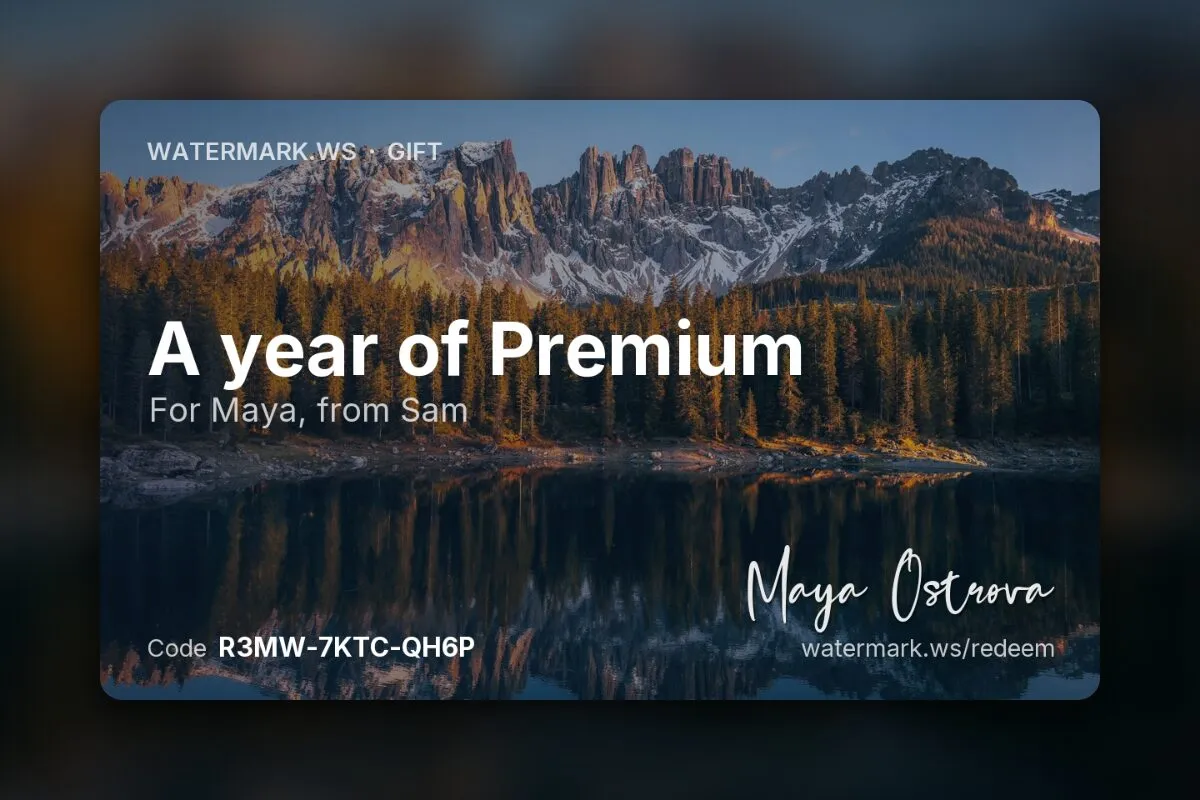
If they have no plan yet, the year starts the day they claim the code; if they already have one, the year is added to it. Either way the watermark maker opens with their name already typed in as a signature, so their first watermark takes minutes. If you would rather design it for them yourself, see make their watermark yourself below.
Make Their Watermark Yourself
Ask someone who has just got serious about photography whether they have a watermark, and the answer is often "not yet". Designing one for them is a small gift on its own, or a personal touch on any gift above: it is their name, it fits any camera, and it is useful from the next photo they post.
-
Type their name or @handle
Open the watermark maker, which needs no photo and runs in the browser, and type the name they already post under, spelled exactly as they spell it. Watermark name ideas covers the options.
-
Add a tagline, or leave it off
A short second line such as "Portraits", "Landscapes" or their town tells people what they shoot. One or two words is plenty.
-
Pick a style
Their name fills every style at once. A handwritten signature suits portraits and weddings; clean capitals suit landscapes and architecture. Look at their feed: if it is warm and soft, a signature fits; if it is clean and graphic, spaced capitals or a monogram. When in doubt, make two and let them choose.
-
Download it
Save it as a transparent PNG, 1,000 pixels wide, which is free in every style and plenty for a card or a phone. The larger PNGs, the SVG and the video overlays come with Premium.



- Print it on a plain card. Pick a dark color for the mark before you download, place the PNG on a white or kraft card, and write the message inside.
- Or put it on one of their photos. Add the mark in a quiet corner of a favorite from their feed and have it printed: a print of their work, and a preview of every photo to come.
- Send the PNG too, so they can use it the same day.
To put it on their photos they need a tool. The free plan marks one file per edit, and only in the plainest styles; a year of Premium (idea 13) puts it on a whole shoot at once and keeps it as a template. Your design does not travel with a gift code, so send the PNG along or tell them which style and font you picked, and they can rebuild it in the maker in a minute.
Business Tools: Contracts, Invoicing and Scheduling
For someone turning photography into paid work, the useful gifts are often the dull ones. They save hours of admin and make the business look professional.
15. Contracts written for photographers. A template set from a photography lawyer, or an hour with a local lawyer to review theirs. A contract settles who may use the photos and how; see who owns the photos for why that matters.
16. A year of client management, invoicing or scheduling. Tools such as HoneyBook, Dubsado and Studio Ninja handle enquiries, contracts and invoices; Calendly handles booking. Ask first: someone with two clients a month may be happy on a free tier.
How to Give Software
The awkward part of a digital gift is the handing over. There are three ways to do it, and the right one depends on how the service is sold.
| How you give it | Works for | Watch out for |
|---|---|---|
| A gift card or gift code | Services that sell gifts: Skillshare, MasterClass, a photo lab's e-gift card, Watermark.ws | Whether it renews when it ends, and whether it expires if not claimed |
| Paying a year up front on their account | Editors, hosting, business tools and anything tied to their login | Their card stays on file, so tell them when the year ends |
| A printed card or an email on the day | Any of the above | Codes in an email can land in spam; tell them to look |
- Prefer gifts that do not renew. A gift that quietly becomes a subscription on their card is not much of a gift. A Watermark.ws gift ends without charging anyone; for anything else, check the terms before you buy.
- Give something to unwrap. A printed card in an envelope, or a print of one of their own photos with the code on the back, turns an email into a present.
- Schedule the email. Several services, Watermark.ws included, let you pick the day the email goes out, so a gift bought tonight arrives on the birthday morning.
Sample photos: Gift and camera by Jim Kalligas, Prints by Corinne Kutz, Mountain lake by Tobias Reich, Window portrait by Siyavash Lolo, Lake at dusk by Arthur Hinton, Rainy street by kt Leung on Unsplash.