
On this page
- Why Product Photos Get Copied
- Check the Marketplace Rules First
- Where a Watermark Does Help
- Placement: Frame the Product, Don’t Cover It
- Where It Goes on Different Kinds of Shots
- Size, Opacity and Color
- Use Your Logo, Not a Copyright Line
- Keep Two Exports: Clean and Branded
- When a Copycat Uses Your Photos Anyway
- Product Photo Watermark Checklist
Why Product Photos Get Copied
Good product photography is expensive: a studio, lighting, styling and editing for every item. Copying it is free. Resellers and copycat shops lift photos straight from other listings, which saves them the work and makes their listing look exactly as trustworthy as yours.
A watermark is the obvious answer, but product photos are different from portfolio photos in two ways. The product has to stay completely visible, because the photo is what sells it. And the biggest places you sell may not allow watermarks at all.
- On marketplaces, check the rules first — eBay does not allow watermarks, and Etsy recommends against them.
- On your own store and social media, a small logo is fair game and helps people find you when photos are shared.
- Never cover the product. Put the watermark in the space around it.
- Keep two exports: a clean set for marketplaces and a branded set for everywhere else.
Check the Marketplace Rules First
Before you watermark a single photo, check the rules of every place you list. A watermark on the wrong platform can get your photos rejected or your listing hidden. At the time of writing:
| Platform | What its policy says | What it means for you |
|---|---|---|
| eBay | The eBay picture policy lists “watermarks of any type, including those used for ownership attributions” among the things photos may not contain, along with added text, artwork and borders. | Upload clean photos. Do not add your name, logo or website. |
| Etsy | Etsy’s help article on protecting listing images says it generally would not recommend watermarks, because they make photos unsuitable for Etsy features such as Etsy Finds emails and ineligible for off-site ads like Google Shopping. | Allowed, but it can cost you visibility. Etsy suggests showing your brand inside the photo instead — packaging, a tag, a sign. |
| Amazon | Amazon’s product image requirements in Seller Central say the main image must show the product on a pure white background, without logos, watermarks or added text. | Keep the main image clean. Check Seller Central for the current rules on other images in your category. |
| Your own website | Your rules. | A small logo is a sensible default. |
Marketplace image rules are updated regularly and can differ by country and category. Treat this table as a starting point and check each platform’s current seller policy before you upload.
Where a Watermark Does Help
Outside the marketplaces, a discreet watermark earns its place:
- Your own online store. Photos from your site are the ones most often lifted by copycat shops. A logo means a stolen photo still advertises you.
- Social media. Posts get screenshotted, reposted and pinned without credit. A watermark is how people trace a product back to your shop.
- Wholesale catalogs and line sheets. Photos sent to stockists travel far beyond the people you sent them to.
- Previews of new products. Photos shared before launch are exactly what a competitor would like to copy.
Be realistic about what it does. A small logo will not stop a determined copier, who can crop or retouch it out. What it does is make lazy copying less attractive, give you proof of ownership when you file a takedown, and turn reposts into free advertising.
Placement: Frame the Product, Don’t Cover It
On a portfolio photo, the most protective watermark goes over the subject. On a product photo, that is the one place it cannot go — a shopper needs to see every detail. Here are three options on the same product:

Best for: Your store, social media and anywhere the product must look its best.

Best for: Hero images and lookbooks that get copied a lot.

Best for: Pre-launch previews and catalogs sent to people you do not know.
For everyday selling, the first option wins. Look for the calmest area of the photo — a plain background, a shadow, a clean surface — and keep the logo small. Overlapping the product’s edge is a reasonable middle ground for your most copied images, because cropping it out means cutting into the product itself.
Where It Goes on Different Kinds of Shots
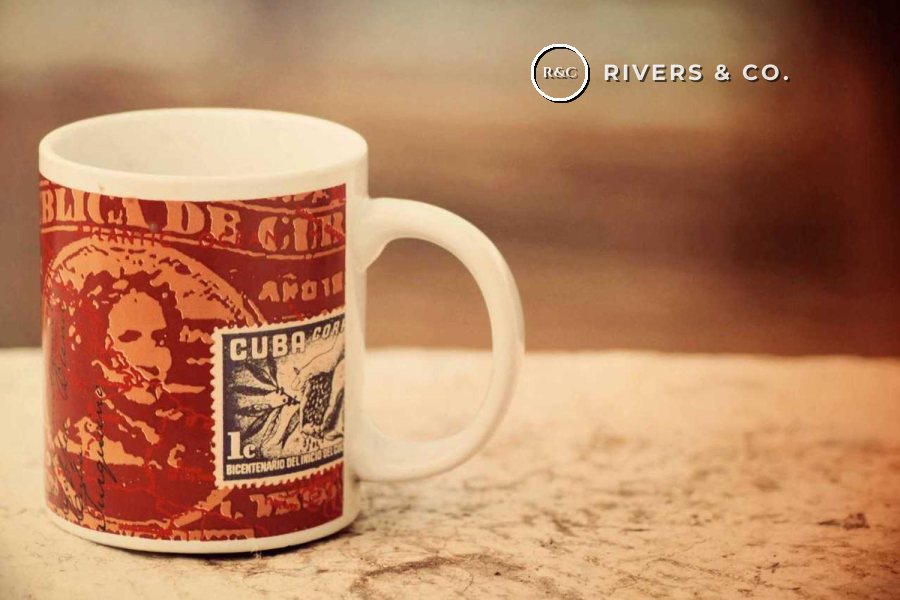


Across all three, the same rules apply: small, in the calmest part of the frame, and in the same spot and size on every photo of a collection, so your shop looks consistent when the photos sit side by side.
Size, Opacity and Color
- Size: roughly 10–20% of the image width. Big enough to read on a phone, clearly smaller than the product.
- Opacity: 70–90%. A small logo at low opacity just looks like a smudge on the photo; if it is small and out of the way, it can afford to be fairly solid.
- Color: white on dark or colored backgrounds, dark gray on white and light ones. A full-color logo often clashes with the product’s own colors.
- Consistency: the same size, color and position across a whole collection, so a page of your products looks like one shop.
Keep a white version and a dark version of your logo as transparent PNG files. With those two, you can brand any product photo without the logo fighting the colors in the shot.
Use Your Logo, Not a Copyright Line
For a shop, the watermark’s real job is to be recognized, so your logo usually beats a line of text. It matches your packaging and website, and a customer who sees it on a repost knows where to buy.


In Watermark.ws you can add your logo as a watermark, then set its size, position and opacity like any text watermark. If your logo has a white or colored background, use a PNG with a transparent background so only the mark itself shows. For a side-by-side comparison, see logo or text watermark, or follow the guide to adding a logo to photos.

Keep Two Exports: Clean and Branded
The simplest way to handle mixed rules is to stop choosing. Export every product photo twice: a clean version for marketplaces, and a branded version for your own channels.


- Keep your edited originals in one folder. These are your clean marketplace files.
- Upload the same photos to Watermark.ws and add your logo in a calm area of the frame.
- Apply it to every photo in the batch, then adjust any shot where the logo touches the product.
- Resize for the web if you like — your store rarely needs full-resolution files.
- Save the settings as a template so every new product drop gets the same logo, size and position.
- Download everything and upload the branded set to your store and social accounts.
Because Watermark.ws works on copies, your clean originals stay untouched, so the two sets never get mixed up.
When a Copycat Uses Your Photos Anyway
Watermarked or not, some of your photos will be copied. What you can do about it depends mostly on being able to prove they are yours:
- Keep your originals. Full-resolution files and camera RAW files are the strongest evidence that you took the photo — a copier only has the web-sized version.
- Find the copies. A reverse image search, such as Google Lens, shows where else a photo appears online.
- Report through the platform. Marketplaces and social networks have intellectual property reporting processes. On eBay, the Verified Rights Owner (VeRO) program lets rights owners report listings, and eBay’s intellectual property policy does not allow sellers to use other people’s photos without permission.
This is where a watermark on your own channels pays off. A copied photo that still carries your logo is an easy case to make, and it is obvious to shoppers who the original seller is.
Product Photo Watermark Checklist
- Check each marketplace’s current image policy before uploading.
- Keep a clean set of every photo for marketplaces.
- Use your logo, small, in the calmest part of the frame.
- Keep the same size and position across a collection.
- Show your brand inside the photo too — packaging, tags, props.
- Watermark photos for platforms that do not allow it.
- Cover any part of the product a shopper needs to see.
- Use a large, center watermark on everyday product photos.
- Add prices, offers or shipping claims as a watermark.
- Rely on a watermark alone — keep your originals as proof of ownership.
Sample photos: Vintage camera by Nicola Perantoni, Mug by Shyamanta Baruah, Flat lay by Vadim Sherbakov, Coffee by Justin Leibow, Teapot by Vee O, Clock by petradr on Unsplash.