On this page
- The Three Ways AI Images Are Marked
- Visible Labels: Easy to See, Easy to Crop
- Invisible Watermarks: SynthID and Others
- C2PA Content Credentials: Watermark or Label?
- Which AI Image Generators Use Which Marks
- How to Check Whether an Image Was Made by AI
- What the Marks Cannot Tell You
- What This Means for Photographers and Artists
The Three Ways AI Images Are Marked
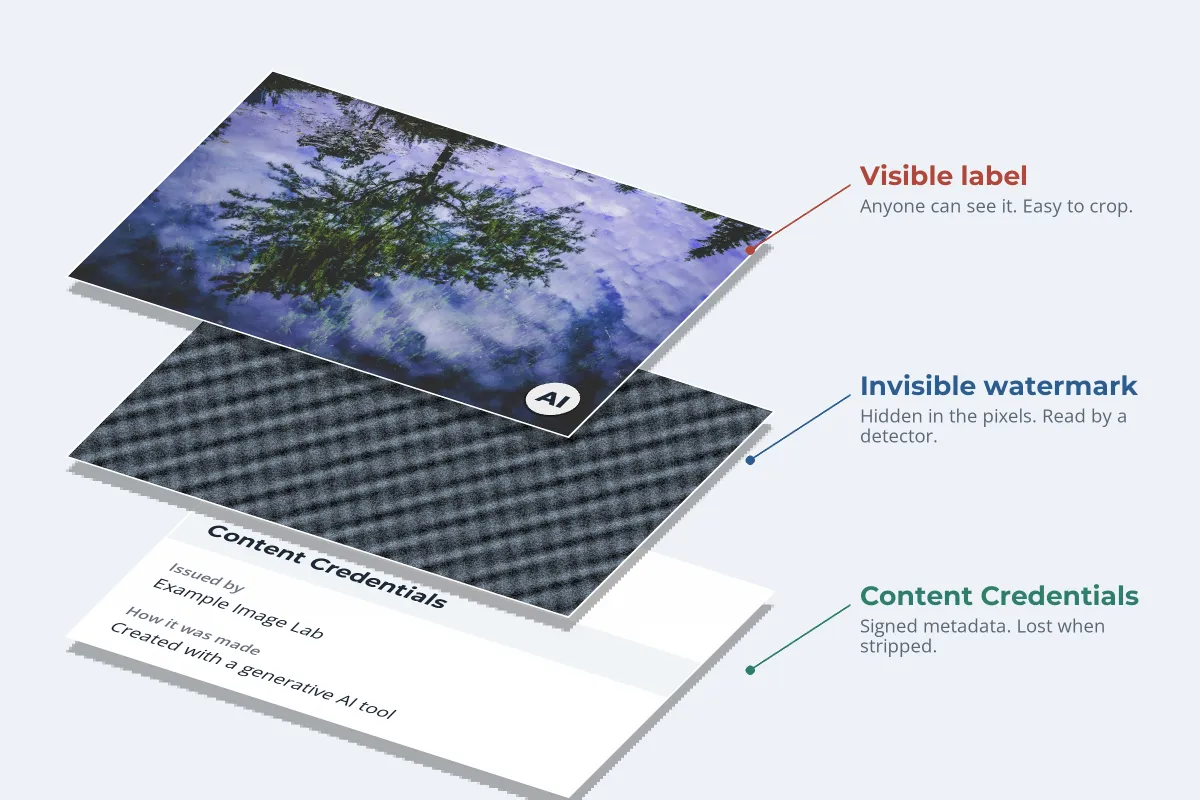
When people search for a "C2PA watermark" or ask whether an AI picture carries a hidden mark, they are usually talking about one of three different things. The big image generators now use one, two or all three of them on the same picture:
- A visible label: a small logo or badge in a corner of the image that anyone can see.
- An invisible watermark: a signal hidden in the pixels themselves, such as Google’s SynthID, that only a detector can read.
- C2PA Content Credentials: a signed record attached to the file, saying which tool made the image and when.
- C2PA is not a watermark. It is signed metadata. It can be paired with an invisible watermark so a stripped record can be found again.
- SynthID is the most widely used invisible watermark. Google uses it, and OpenAI added it to its images in May 2026.
- Visible labels are the weakest layer. They are easy to crop, and Google made its own optional in August 2026.
- No mark found proves nothing. Marks can be stripped, and some tools never add them.
Visible Labels: Easy to See, Easy to Crop
A visible label works like any corner watermark: it tells every viewer something without software, and it disappears with one crop.


The image is a real photograph with a generic "AI" badge added for illustration. It is not the mark of any particular generator.
Google’s Gemini app has placed a small sparkle in the corner of the images, videos and music it generates. In August 2026, Google added a Media watermark setting that lets users switch that visible mark off, while keeping the invisible SynthID watermark and the C2PA metadata. Meta said in 2024 that photorealistic images made with Meta AI carry visible markers as well as invisible watermarks and metadata. Most other major generators do not add a visible mark to still images at all.
That is the same lesson photographers learned long ago: a small corner mark is a signature, not a lock. If you want a visible mark that is hard to remove, it has to cross the picture, as how to make a watermark hard for AI to remove shows.
Invisible Watermarks: SynthID and Others
An invisible watermark is built into the pixels when the image is generated. Google DeepMind describes SynthID as imperceptible to humans and "designed to stand up to modifications like cropping, adding filters, changing frame rates, or lossy compression." Because it lives in the image itself rather than in the file, it can survive a screenshot that would wipe out any metadata.
- Google watermarks content from its generative AI products with SynthID, including images made in the Gemini app.
- OpenAI announced on May 19, 2026 that it is adding SynthID, through a partnership with Google, to images generated in ChatGPT, Codex and the OpenAI API, alongside the Content Credentials it already used.
- Others: Google lists NVIDIA and Kakao among the partners whose SynthID-marked content its detector can check, with Apple to follow. Meta has used its own invisible watermarks on Meta AI images.
The catch is that only the right detector can read a watermark. SynthID marks are checked with Google’s tools, and another company’s watermark needs that company’s detector. The general idea behind invisible watermarks, and why nobody can see them, is covered in invisible watermarks and Content Credentials.
C2PA Content Credentials: Watermark or Label?
C2PA is the open standard behind Content Credentials. It is often called a watermark, but it is something else: a signed record embedded in the file’s metadata. For an AI image, that record typically says which company issued it, that the image was created with a generative AI tool, and when. It often uses the IPTC "digital source type" value trainedAlgorithmicMedia, the industry code for media created by an AI model.
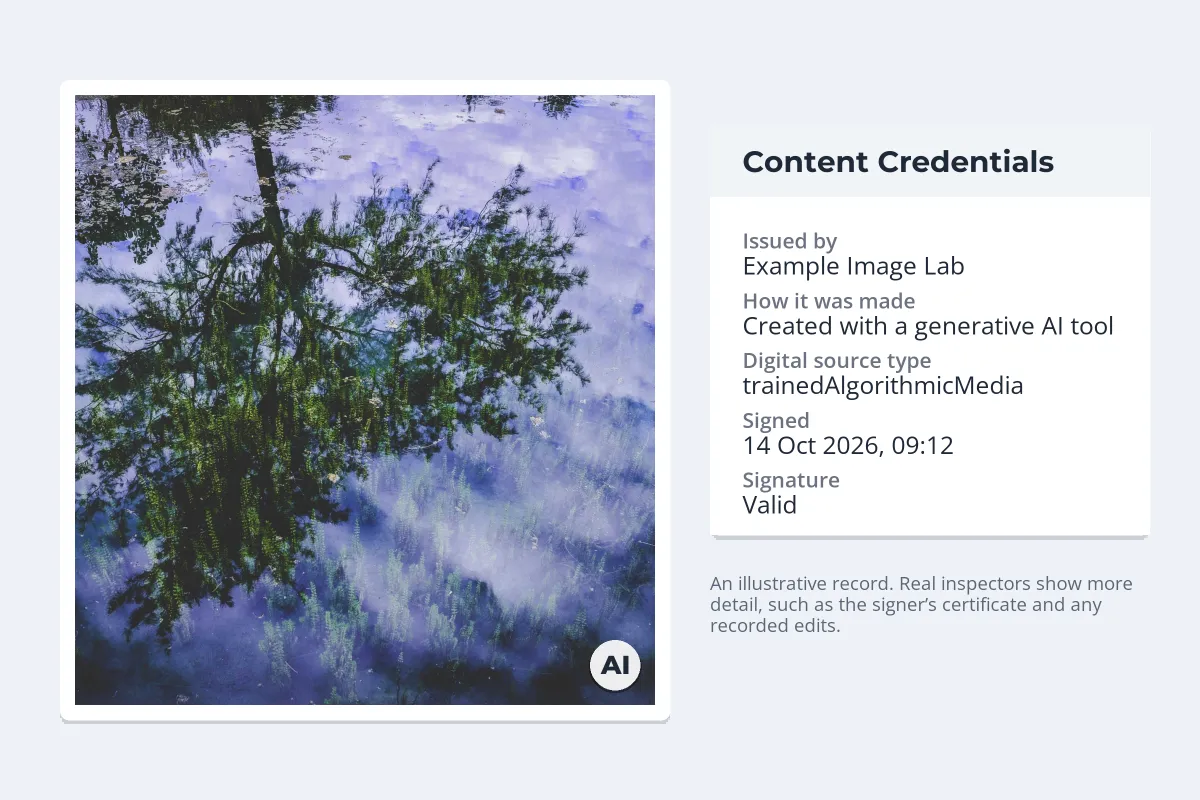
The signature makes the record tamper-evident: change the image or the record and the check fails. But metadata can simply be removed, and a screenshot or many social platforms will drop it. That is why the standard allows a record to be paired with an invisible watermark or fingerprint, so a stripped image can be matched back to its stored credentials. OpenAI’s own explanation for adding SynthID makes the same point: metadata "can be stripped, lost through uploads and downloads, or broken by transformations."
Comparing Firefly’s Content Credentials with the others: Adobe automatically applies Content Credentials to assets where all of the pixels were generated with Firefly, such as text to image, and says those credentials may also be stored in its public Content Credentials cloud. That stored copy is what lets a credential be recovered after the embedded one is stripped.
Which AI Image Generators Use Which Marks
This is what each company has said publicly, as of October 2026. Policies change often, so check the provider’s own pages before relying on any row.
| Generator | Visible label | Invisible watermark | C2PA Content Credentials |
|---|---|---|---|
| ChatGPT and OpenAI API | No, for images | SynthID, since May 2026 | Yes, since 2024 |
| Google Gemini (Nano Banana) | Corner sparkle, optional since August 2026 | SynthID | Yes, starting with Nano Banana Pro in November 2025 |
| Adobe Firefly | No | Not stated for Firefly images | Yes, for fully generated images |
| Azure OpenAI (Microsoft) | No | Not stated | Yes, on all generated images |
| Meta AI | Visible markers on photorealistic images (2024) | Yes (2024) | IPTC metadata (2024) |
Open-source image models are the big exception. When someone runs a model on their own computer, whether its output is marked depends on how they set it up, and marking can usually be switched off.
In the EU, Article 50(2) of the AI Act requires providers of generative AI systems to mark their output in a machine-readable way so it can be detected as AI-generated. According to the European Commission, the rule applies from August 2, 2026, with a grace period to December 2, 2026 for systems already on the market before August 2.
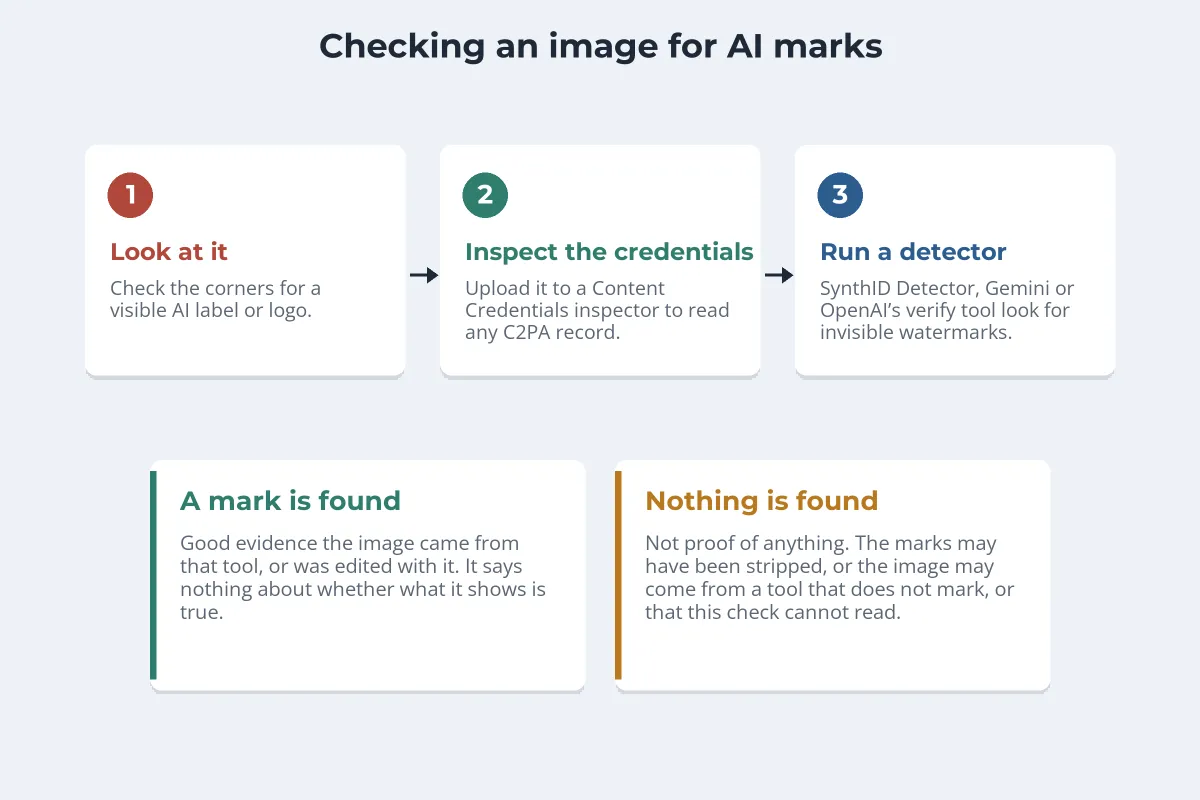
How to Check Whether an Image Was Made by AI
-
1
Look at the image
Check the corners for a generator’s logo or an AI badge. Its absence means little, since labels are easy to crop and can be switched off.
-
2
Inspect the Content Credentials
Upload the file to the Content Authenticity Initiative’s Verify tool at contentcredentials.org/verify. It shows any C2PA record, including who signed it and whether AI was involved. Use the original file if you can; a screenshot will not carry the record.
-
3
Ask Google about SynthID
Upload the image to the Gemini app and ask whether it was made or edited with Google AI, or use the SynthID Detector. Google says its detector can also recognize SynthID marks from partners including OpenAI and NVIDIA.
-
4
Use the maker’s own tool
OpenAI offers a public verification tool, in preview since May 2026, that checks images for its Content Credentials and SynthID watermark.
-
5
Look for a platform label
Some social platforms read these signals on upload and show an AI label next to the post.
What the Marks Cannot Tell You
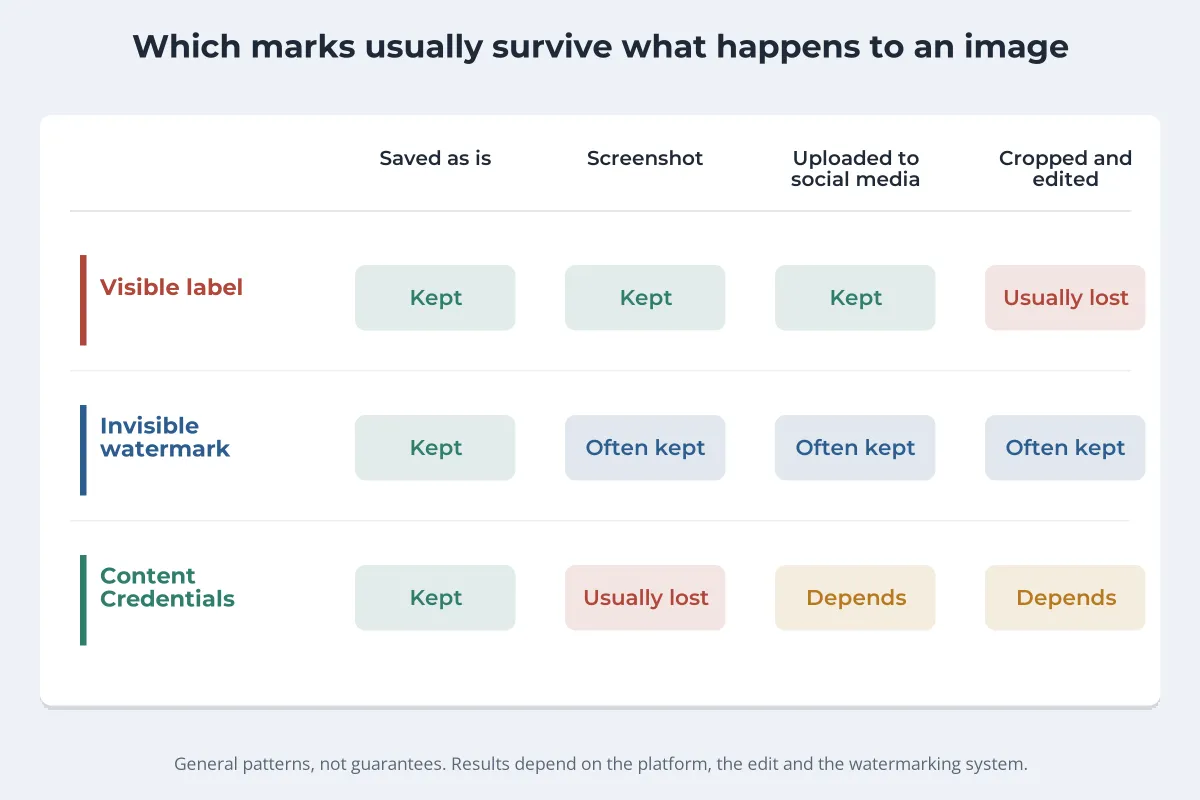
- No mark is not proof of a real photo. OpenAI’s own tool deliberately draws no conclusion when it finds nothing, because signals can be stripped.
- A mark only speaks for its own maker. A SynthID check cannot recognize another company’s watermark, and a Content Credentials check finds nothing in a file whose metadata was removed.
- A mark says how an image was made, not whether it is true. A genuine photo can mislead, and a labeled AI image can be harmless.
- Edits blur the line. An AI-edited photo may be marked as AI-generated or as edited, depending on the tool and the change.
What This Means for Photographers and Artists
These systems are built to label AI output, not to protect your work. Your own photos carry none of these marks unless your camera or editing software adds Content Credentials, and some now can. Two practical takeaways:
- Provenance works for you too. If your camera or editor can sign your files with Content Credentials, a signed original can help show a photo is yours and how it was edited. Your name and copyright in the file’s metadata help as well; see copyright in photo metadata.
- The visible watermark is still the one people read. Credentials and invisible marks need software. A visible watermark credits you to everyone who sees the image, wherever it ends up.
If your concern is AI models training on your work rather than labeling their own output, see how to protect your art from AI training, and Glaze vs Nightshade for two tools built against it. Whether an AI image can be copyrighted at all is a separate question, covered in can you copyright AI art? Watermark.ws adds visible text and logo watermarks to photos, PDFs, GIFs and videos; it does not add invisible watermarks or Content Credentials.
Sample photos: Tree reflection by Yu-chuan Hsu, Sunset over a hill by Lauren Coleman on Unsplash.