

On this page
JPEG, PNG or WebP: The Short Answer
For watermarked photos, JPEG is still the safe default, PNG is for logos and graphics rather than photos, and WebP gives you smaller files where it is accepted. The deciding factors are what the file will be used for, whether it needs transparency, and how much compression the watermark text can take before it smudges.
- Photos you post or send: JPEG at quality 80–90. Fine watermark text stays clean and every site and app accepts it.
- Your logo file: PNG with a transparent background, so it never shows up as a white box.
- Your own website: WebP: in our test, WebP at quality 75 was half the size of JPEG at quality 85 and looked close to it.
- Avoid: PNG for finished photos (huge files) and low JPEG quality on photos with thin watermark text.
| JPEG | PNG | WebP | |
|---|---|---|---|
| Compression | Lossy | Lossless | Lossy or lossless |
| Transparency | No | Yes | Yes, in both modes |
| File size for photos | Small | Very large | Smallest |
| Sharp text and edges | Good at high quality | Perfect | Good, softer at low quality |
| Accepted for uploads | Everywhere | Almost everywhere | Most sites, not all |
| Best for | Finished photos | Logos, graphics, screenshots | Photos on your own website |
How Much Each Format Weighs
To compare them fairly, we took one 1800 × 1200 photo with a watermark and saved it seven ways, using the standard JPEG, PNG and WebP encoders built into PHP. These are the actual file sizes:
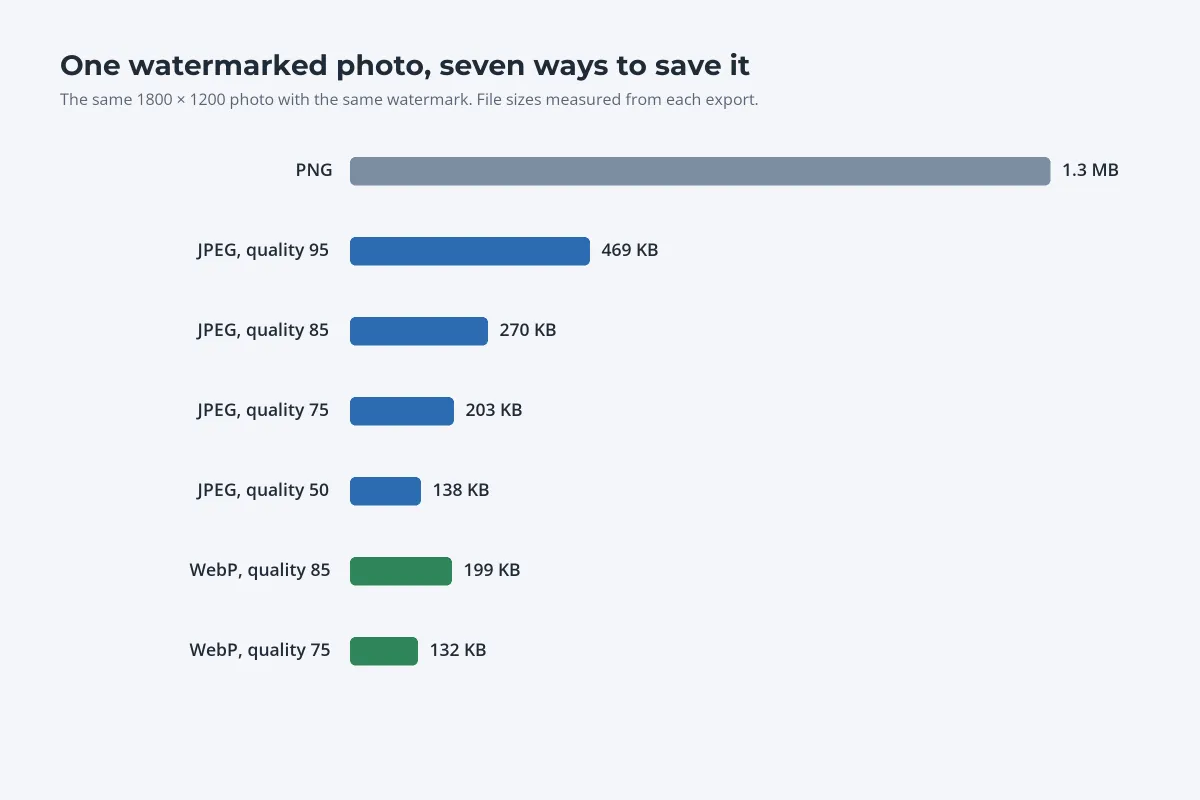
PNG keeps every pixel exactly, which is why it is so large for photos: there is no loss, but there is also no saving. JPEG at quality 85 was a fifth of the PNG’s size. WebP at quality 75 came in slightly smaller than JPEG at quality 50, and as the crops below show, it looked much better. That matches Google’s own figures, which put lossy WebP at 25–34% smaller than comparable JPEGs.
Your numbers will differ with the photo, its size and the software you export from, but the order almost never changes: PNG largest, then JPEG, then WebP. Pixel dimensions matter as much as format, as resizing photos before you share them shows.
What Compression Does to Watermark Text
Lossy formats save space by throwing away detail the eye is unlikely to miss. Sharp, high-contrast edges are what they handle worst, and a watermark is made of exactly that: thin letters against a smooth sky or a plain wall. Here is the same corner of the photo above, enlarged six times, from four of the exports:




The halos at JPEG 50 are called ringing, or mosquito noise. JPEG stores the image in small 8 × 8 pixel blocks, and when it simplifies a block that contains a hard edge, the error spreads into the flat area around the letter. At normal viewing size it makes a crisp watermark look slightly dirty, and on a faint watermark it can turn the letters into a smudge. Keep JPEG quality at 80 or above for photos with fine watermark text; around 85 is a good default.
Colored Watermarks and JPEG
JPEG has a second weakness that only shows with color. Many JPEG encoders, especially at everyday quality settings, store brightness at full resolution but color at half resolution, a trick called chroma subsampling. Photos barely suffer, because color in a photo changes gently. A saturated logo with thin lines does suffer:
 JPEG 90
 PNG
Even at quality 90, the red letters pick up dark fringes and the color leaks a pixel or two into the sand. It is the reason a bright red or blue watermark can look fuzzy on a JPEG while a white or gray one looks sharp. If your watermark is colored, keep it bold rather than hairline-thin, consider a white or neutral version for photos, and see what color a watermark should be for the trade-offs.
The Logo File: Always PNG
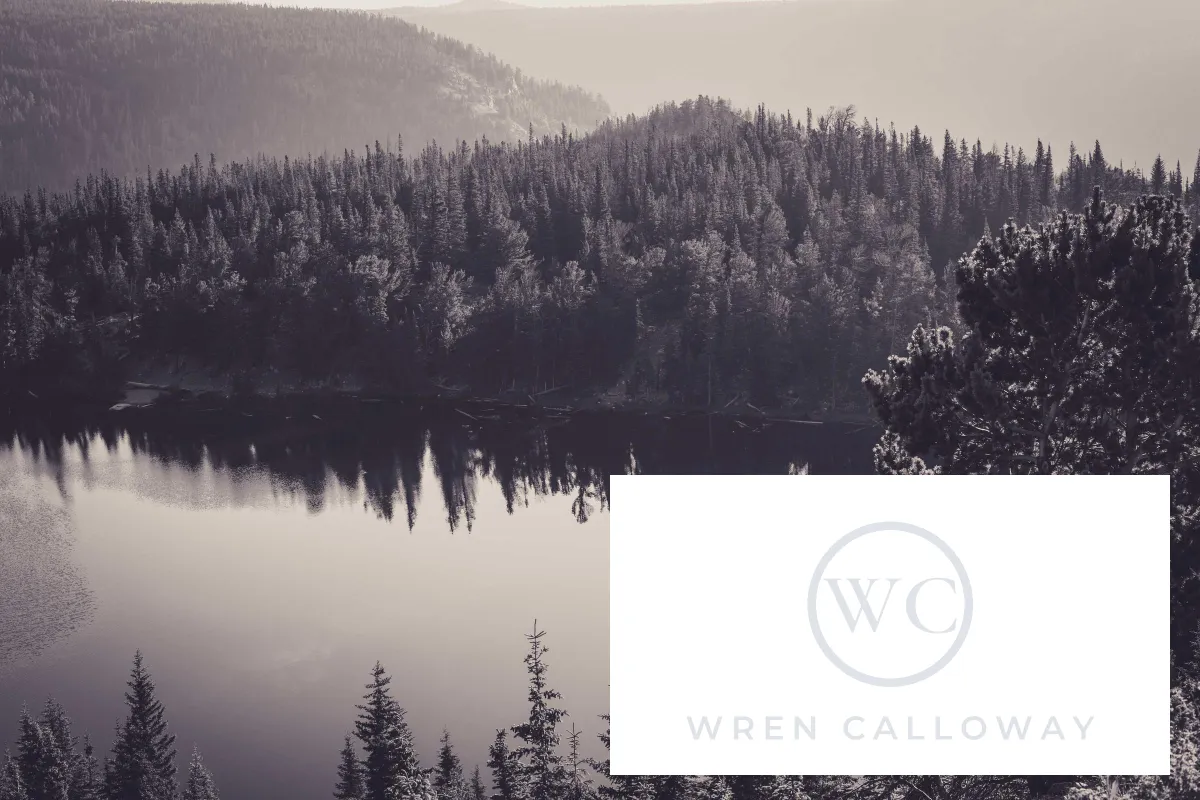
Everything above is about the finished photo. The logo you use as a watermark is a different case. A logo file needs transparency, so that only the logo lands on the photo and the space around it stays see-through. JPEG cannot store transparency at all.
 Logo saved as JPEG
 Logo saved as PNG
Save a logo with a transparent background as a JPEG and the transparent area is filled with a solid color, usually white. Placed on a photo, it becomes a box. Keep your logo as a PNG with transparency (WebP also supports it, but PNG is accepted almost everywhere). How to make a transparent PNG logo walks through preparing one.
Platforms, Re-Saving and a Sensible Workflow
Two more things affect how your watermark looks once it is out in the world:
- Platforms recompress uploads. Social networks, marketplaces and messaging apps usually resize and re-encode what you upload, whatever format you send. You cannot control their settings, but you can avoid stacking damage: upload a clean, high-quality file at a sensible size rather than one that is already heavily compressed.
- Every JPEG save loses a little. Opening a JPEG, editing it and saving it again compresses it again. Do all your edits on the original or a lossless master, add the watermark last, and export once.
- Not every site accepts WebP. Browsers display it, but some upload forms still only take JPEG and PNG. Keep JPEG for anything you upload elsewhere, and use WebP where you control the page.
- iPhone photos are often HEIC. Many websites cannot display HEIC, so convert to JPEG for sharing.
-
Edit the original
Crop, color-correct and retouch in your editor, working from the camera file or a lossless copy.
-
Export in the format you will publish
A JPEG at quality 80–90 for most uses, or a PNG if the image is a graphic or screenshot with flat colors and text, as in how to watermark a screenshot.
-
Add the watermark
Watermark.ws keeps JPEG and PNG: a JPEG comes back as a JPEG and a PNG as a PNG. HEIC and RAW come back as JPEG, and WebP, TIFF and PSD as PNG. On Premium and Ultimate, pick JPEG, PNG or WebP and a quality before you download, so every photo comes out as what you will publish.
-
Check at 100%
Zoom into the watermark on the finished file. If you see halos around the letters, export again at a higher quality.
Animated images have their own rules, covered in watermarking animated GIFs. For which photo formats Watermark.ws accepts, including WebP, HEIC and RAW files, see watermarking photos online.
Sample photos: Sea stacks on a black sand beach by Annie Spratt, Misty lake and forest by Samuel Rohl on Unsplash.