On this page
- How to Report a Stolen Pin: The Short Answer
- Saved, Re-uploaded or Scraped: Is the Pin Really Stolen?
- Collect the Evidence Before You Report
- How to File a Pinterest Copyright Report
- What Happens After You Report a Pin
- When the Stolen Pin Links to a Copycat Website
- If It Keeps Happening: Pinterest’s Content Claiming Portal
- Make Stolen Pins Point Back to You
How to Report a Stolen Pin: The Short Answer
To report stolen pins on Pinterest, you file a copyright report. Pinterest handles these under the US Digital Millennium Copyright Act (DMCA), and anyone who owns the copyright, or is authorized to act for the owner, can file one, wherever they live. You can start from the pin itself or go straight to the copyright form.
- Check it is really stolen. A save that keeps your link is Pinterest working as intended. A re-upload with no link, or someone else’s, is not.
- Save the evidence: the pin URL, a screenshot, where it links, and your original post.
- Report it through Pinterest’s copyright form, the Report Pin option on the pin, or by email to copyright@pinterest.com.
- Ask for every copy. Start the report with “remove all Pins that contain the image” to catch identical copies too.
- Prevent the next one by putting your website on the image itself, where a crop cannot reach it.
Saved, Re-uploaded or Scraped: Is the Pin Really Stolen?
Pinterest exists for saving other people’s images. When someone saves your pin to their board, or pins an image from your blog with the Save button, the pin keeps a link to your page. Every click still lands on your site. That is the whole point of being on Pinterest, and there is nothing to report.
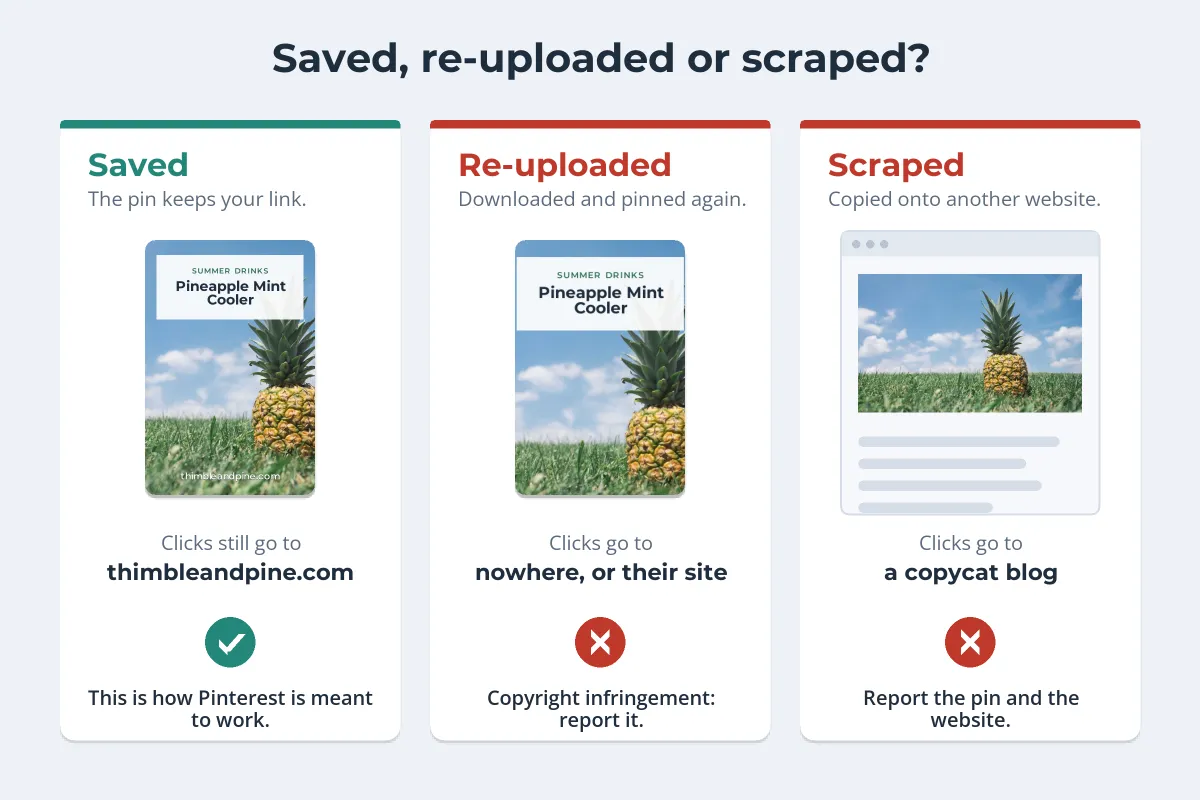
A pin becomes a problem when the image has been separated from your link:
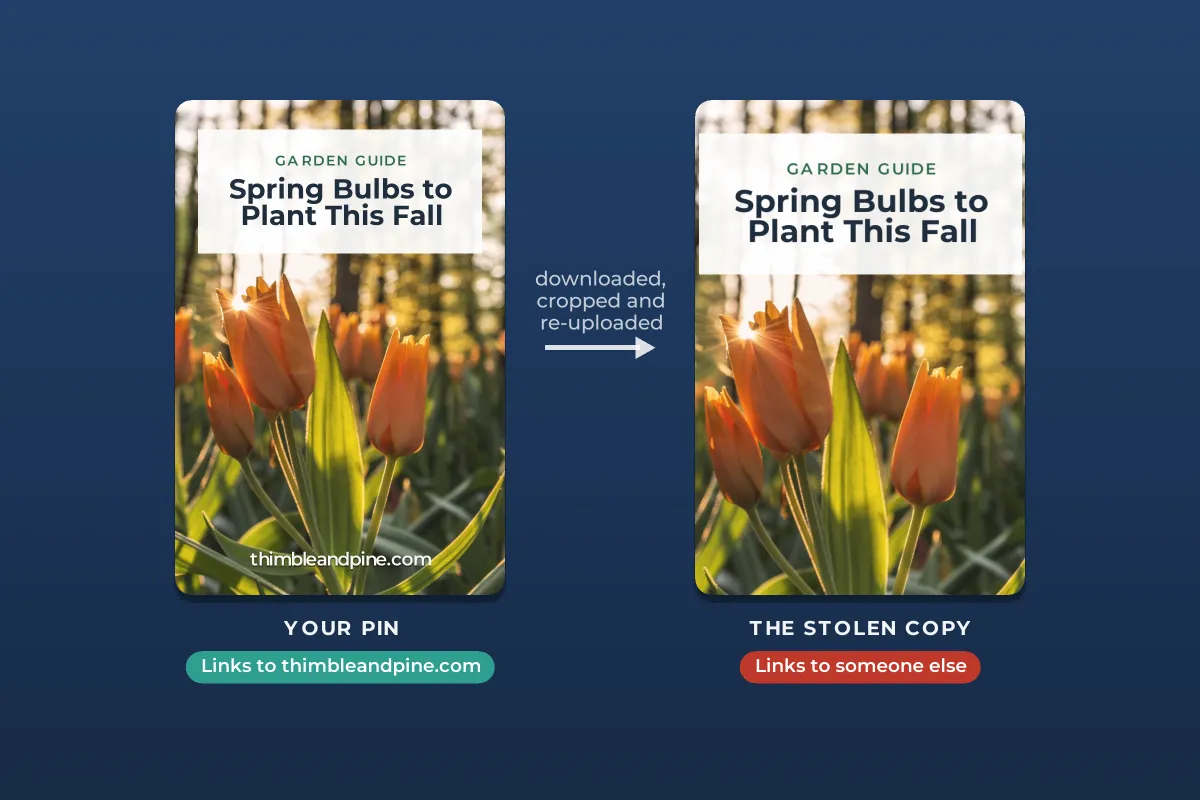
- Re-uploaded pins. Someone downloads your image and uploads it as a new pin, with no link or with a link to their own site, a shop or a spam page. This is the most common kind of stolen pin.
- Scraped posts. A copycat site copies your post, photos included, and those copies get pinned with links to the copycat. Here two things are infringing: the pins and the website.
- Edited copies. Your graphic with the URL cropped off, your title replaced, or someone else’s logo added.
Before you report, rule out permission. Did you license the image to a brand, publish it under a Creative Commons license, or agree to a collaboration? Pinterest also asks you to consider fair use before filing, because bad-faith reports can have legal and financial consequences. Fair use and photos explains what that covers.
Collect the Evidence Before You Report
A stolen pin can be deleted, edited or moved to another board at any time. Capture it first, while it is exactly as you found it.
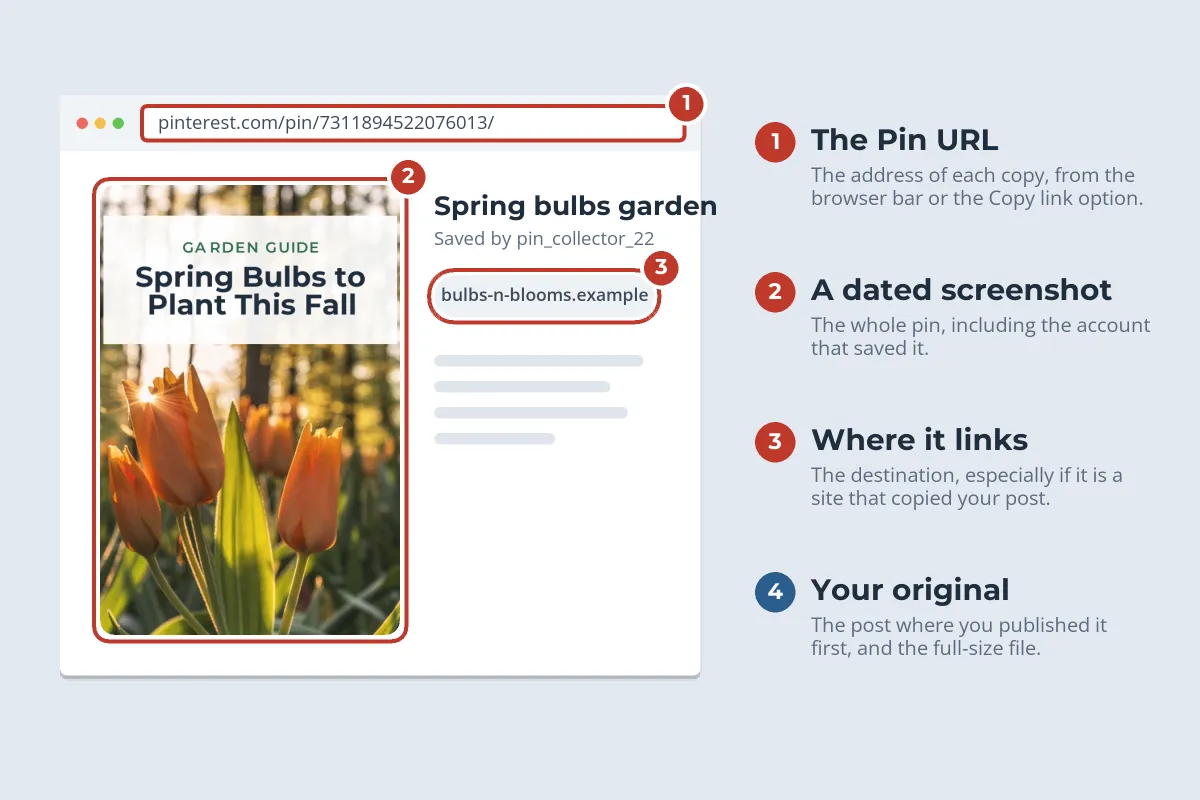
- The pin URL. Open the pin and copy the address from the browser bar, or copy the pin’s link from the share options in the app. Pinterest needs the full pin URL, not the profile or board.
- A dated screenshot of the whole pin, including the account that saved it.
- Where it links. Note the destination. If it is a site that copied your post, you will want to report that site too.
- Your original. The URL of the post where you first published the image, plus the full-size file. Copies on Pinterest are usually smaller, which helps show which version came first.
Stolen pins rarely come alone. Search for other copies before you file, so one report can list them all. In the Pinterest app, the camera icon in the search bar lets you search with a photo from your camera roll, and outside Pinterest, Google Lens and TinEye can find the same image on other sites. How to find stolen photos with reverse image search walks through each tool.
How to File a Pinterest Copyright Report
Pinterest’s copyright policy gives three ways in. They all lead to the same team, so use whichever is easiest:
-
1
From the pin
Open the pin, select the ellipsis (…) icon, then Report Pin. Choose the option for intellectual property, then copyright, to reach Pinterest’s copyright reporting form.
-
2
Or open the form directly
Pinterest’s copyright page at policy.pinterest.com/copyright links to the copyright complaint form. It is the easier route when you have several pins to list.
-
3
Fill in who you are
Your full legal name, mailing address, phone number and email address, and whether you are the owner or acting for one.
-
4
Identify your work and the copies
Link to your original post and describe the image, then paste the URL of each infringing pin, one per line.
-
5
Confirm the two statements and sign
A good-faith statement that the use is not authorized, and a statement under penalty of perjury that the report is accurate and that you are the owner or authorized to act. Typing your full name counts as a signature.
If you would rather not use the form, Pinterest accepts the same information by email at copyright@pinterest.com, which is for copyright reports only, or by post or fax to its designated copyright agent. The required details are the same either way:
| Pinterest asks for | For a stolen pin, that means |
|---|---|
| The copyrighted work | Your photo or graphic, with a link to the post where you published it. |
| The infringing content and where it is | The full URL of every stolen pin, not just the account or board. |
| Your contact details | Mailing address, phone number and email address. |
| Two statements | Good faith, and accuracy under penalty of perjury, worded as the policy gives them. |
| Your name and signature | Your full legal name, typed or signed. |
If the work is an image, Pinterest’s policy says you can ask it to remove all copies. Write “remove all Pins that contain the image” at the very beginning of your report.
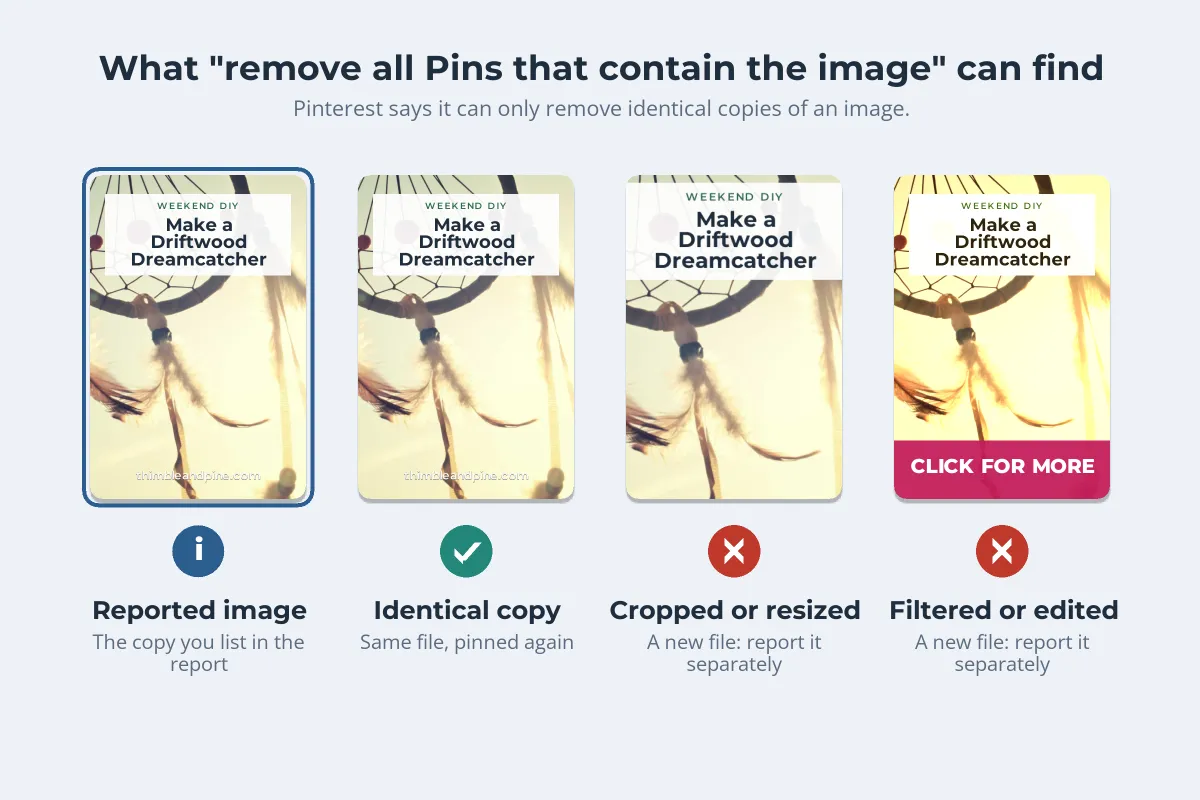
There is a catch. Pinterest says it can only remove identical copies of an image: if a file has been resized or altered, it will not find it. Stolen pins are often cropped, filtered or given a new banner, so list the URL of every edited version you found, even when you also ask for all copies.
What Happens After You Report a Pin
When Pinterest receives a valid report, it takes what its policy calls appropriate action, which may include disabling or removing the pin. It does not publish a set response time.
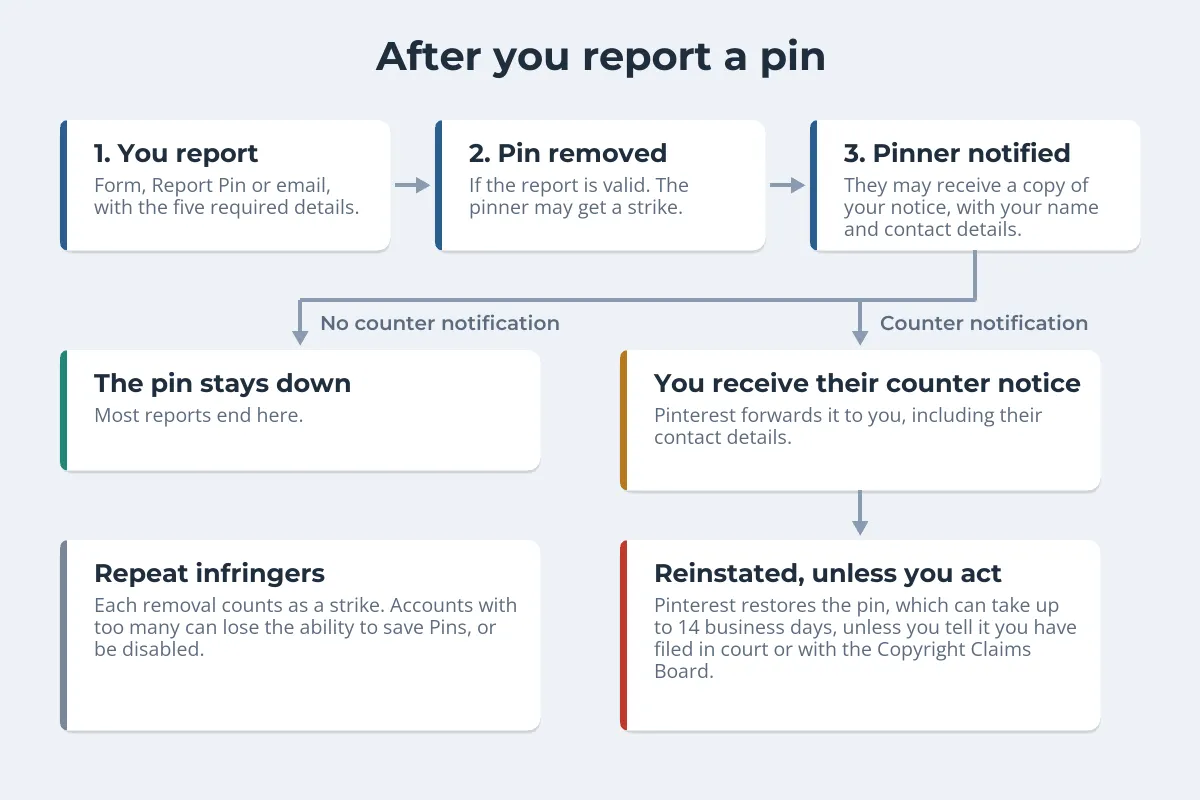
- The pinner is told. Pinterest may notify the person who saved the pin, and may send them a complete copy of your notice, including your full legal name and contact information. Use a business address and email you are comfortable sharing.
- Strikes add up. Each removal counts toward Pinterest’s repeat infringer policy. An account with too many can lose the ability to save pins or be disabled altogether.
- They can push back. If the pinner believes the removal was a mistake, they can file a counter notification, which Pinterest forwards to you with their contact details. Pinterest then restores the pin unless you tell it you have filed an action in court or with the Copyright Claims Board. That process can take up to 14 business days.
- They can appeal the strike. A pinner who does not want to file a counter notification can still ask Pinterest to review the strike.
Most reports end with the pin gone. A counter notification is the point where a takedown turns into a legal dispute, and the right next step depends on what the image is worth to you.
When the Stolen Pin Links to a Copycat Website
Removing a pin does nothing about the website it points to. If your post was copied onto another site, report the pins to Pinterest, then deal with the site separately:
- Ask the site owner, if there is a real person behind it. A short, factual email resolves some cases.
- Send a takedown notice to the host. Most hosts act on DMCA notices even when the site owner does not. How to file a DMCA takedown notice covers what to include and where to send it.
- Ask search engines to drop the page. Major search engines take copyright removal requests, which stops the copy from competing with your post.
Outside the US, the same steps usually still work, because Pinterest and most large hosts accept reports from rights holders anywhere. In the EU, the Digital Services Act also requires hosting services to give people a way to report illegal content, including copyright infringement. For the wider plan, including asking for payment, see what to do when someone steals your photos. If the same image has been reposted on Instagram too, reporting stolen photos on Instagram works much the same way, through its own copyright form.
This article summarizes Pinterest’s published copyright policy as of October 2026. Policies change, so check the current version before you file, and talk to a copyright lawyer if a dispute goes further than a counter notification.
If It Keeps Happening: Pinterest’s Content Claiming Portal
Reporting pins one by one gets tiring if your work is copied constantly. Pinterest’s Content Claiming Portal lets approved rights holders upload their original images and videos and decide how matching pins are handled, for existing pins and future ones. You choose one of four options:
| Option | What Pinterest does with matches |
|---|---|
| Mine only | Removes them, except pins you saved yourself. |
| Website only | Removes them, except pins that link to your claimed website. |
| Block all | Removes every existing and future version. |
| Attribution | Keeps them, but adds your attribution. |
Anyone who owns the exclusive copyright in their content can apply, but access is limited. Pinterest reviews each application and says it can only give a limited number of rights holders access. If you are turned down, you can reapply after 30 days. Once in, you can upload up to 50 works at a time.
For most bloggers and small shops, "Website only" is the interesting option. It keeps every pin that sends traffic to you and removes the re-uploads that do not.
Make Stolen Pins Point Back to You
You cannot stop people downloading an image they can see. Pinterest’s own nopin tag, <meta name="pinterest" content="nopin">, stops saving straight from your pages, but it also blocks the saves that bring you traffic, and it does nothing against downloads and screenshots. What you can control is what a stolen copy still says.
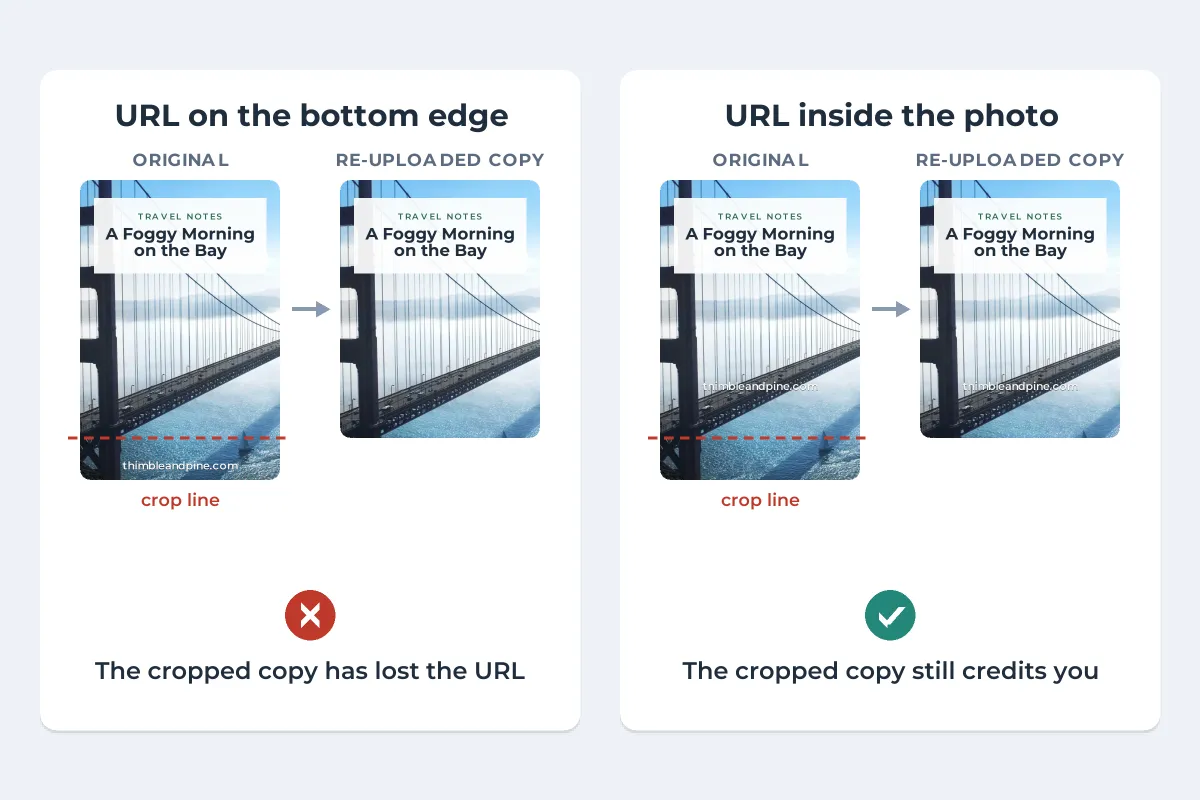
- Put your website on the image. The link on a pin is lost when the image is re-uploaded. A URL on the image travels with every copy, so anyone who finds a stolen pin can still find you.
- Keep it out of the crop zone. Thieves trim the bottom of a pin first. Place the URL a little way into the photo, or across a part of it that cannot be cut without spoiling the image.
- Mark every image in a post, not just the designed pin. Readers pin step photos and detail shots too.
- Keep your originals. Full-size files and the first post date make every future report faster to prove.
Watermark.ws can put your URL or logo on a whole post’s images in one batch, with a soft shadow so it reads on any photo, and save the setup as a template for the next post. For sizing and placement on a 2:3 pin, see how to watermark Pinterest pins.
Sample photos: Tulips by Ales Krivec, Pineapple by Pineapple Supply Co., Dreamcatcher by Dyaa Eldin, Golden Gate Bridge by Modestas Urbonas on Unsplash.