On this page
How a DMCA Takedown Works
The Digital Millennium Copyright Act is a US law. Section 512 of it gives websites, hosts and platforms a "safe harbor": they are not liable for copyright infringement by their users, as long as they follow certain rules. The most important rule is that when they receive a proper notice about infringing material, they must remove it or disable access to it "expeditiously".
That is what makes a takedown notice so effective. You are not asking the person who copied your photo to do anything. You are telling the company hosting the copy that it is there — and the company has a strong legal reason to act. Most takedowns never involve a lawyer or a court.
This article summarizes 17 U.S.C. § 512 and related rules, with links to the text of the law. It is not legal advice. If the stakes are high, a notice is disputed or you are considering a lawsuit, talk to a copyright lawyer.
Before You File: Three Checks
A takedown notice is a legal statement, signed under penalty of perjury. Take two minutes to make sure it is the right tool:
- Is the copyright yours? Only the copyright owner, or someone authorized to act for them, can send a notice. If you assigned the copyright to a client or an agency, it may be theirs to send.
- Is the use really unauthorized? Check whether you, an agency or a license — such as a Creative Commons license — gave permission. A licensed use is not an infringement, even if you have forgotten about it.
- Could it be fair use? Commentary, criticism, news reporting and some other uses can be lawful without permission. A US federal appeals court held in Lenz v. Universal Music (9th Cir. 2015) that copyright owners must consider fair use before sending a takedown. See fair use and photos.
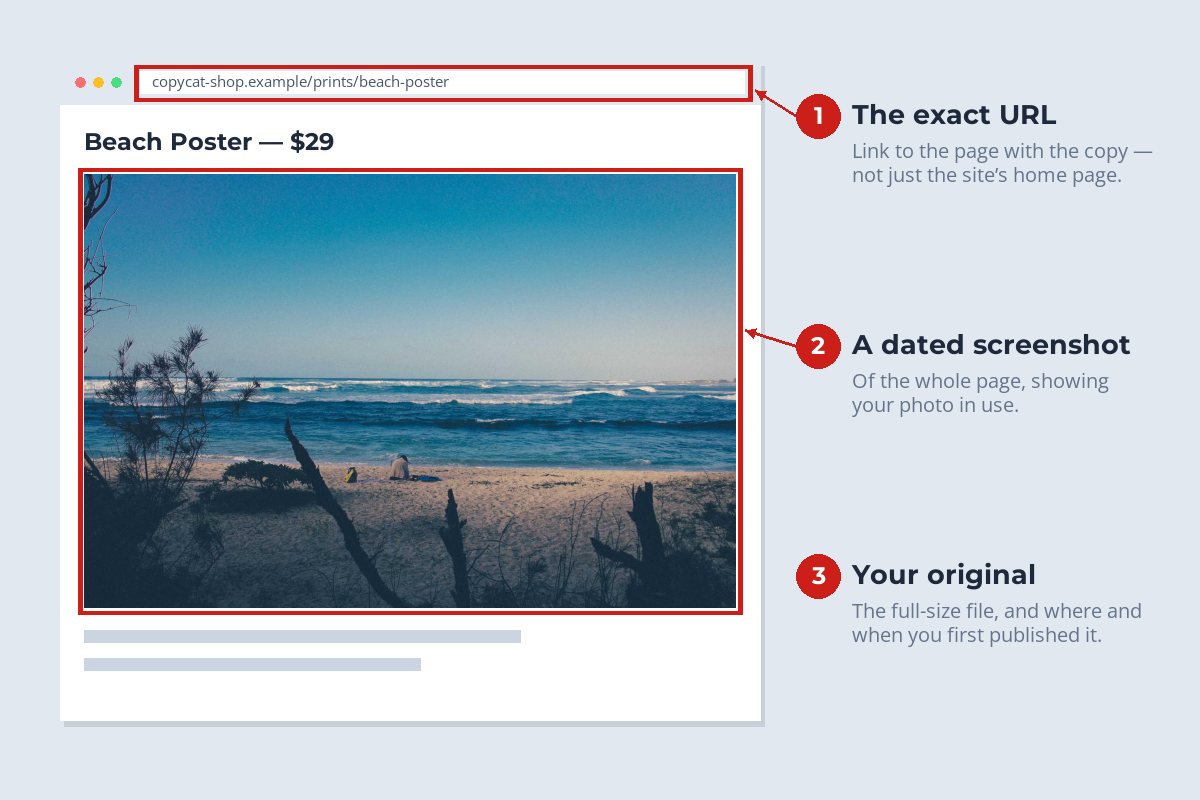
If the answer to all three is clear, collect your evidence before you send anything. Copies disappear and pages change, and you will want a record either way.
To find other places the same photo appears, run a reverse image search — here is how. One notice can list several copies on the same site.
Where to Send It
A notice only counts if it reaches the right place. Work through these in order:
-
1
The platform's own copyright form
Large social networks, marketplaces and portfolio sites usually have a dedicated copyright or intellectual property report form in their help center. Use it: it asks for exactly the required information and routes it to the right team.
-
2
The DMCA designated agent
Service providers that want the safe harbor must register a "designated agent" with the US Copyright Office. You can look them up in the DMCA Designated Agent Directory and send your notice to the contact listed there.
-
3
The web host
For a standalone website, the site owner may ignore you — but the company hosting the site usually will not. A hosting lookup tool can tell you who the host is; send the notice to the host's abuse or copyright contact.
-
4
Search engines
Major search engines accept copyright removal requests for pages in their results. This does not remove the copy from the web, but it makes it much harder to find.
What the Notice Must Include
The DMCA lists six elements a notice must "substantially" include (17 U.S.C. § 512(c)(3)(A)). A platform form will prompt for each; if you are writing an email, cover all six:
| The law requires | For a stolen photo, that means |
|---|---|
| A physical or electronic signature of the owner or someone authorized to act for them | Your full name typed at the end of the notice, or your actual signature. |
| Identification of the copyrighted work | Your photo: its title, and a link to where you published it or a description of the original. |
| Identification of the infringing material and where to find it | The exact URL of each page or image file containing the copy — not just the site's home page. |
| Contact information | Your name, address, phone number and email address. |
| A good-faith statement | That you believe in good faith the use is not authorized by you, your agent or the law. |
| An accuracy statement under penalty of perjury | That the information is accurate and, under penalty of perjury, that you are the owner or authorized to act for the owner. |
The most common reason a notice stalls is that the host cannot find the material. List every URL, one per line, and say which photo each one copies. Keep it factual and polite; you are writing to a support team, not the person who copied you.
What Happens After You Send It
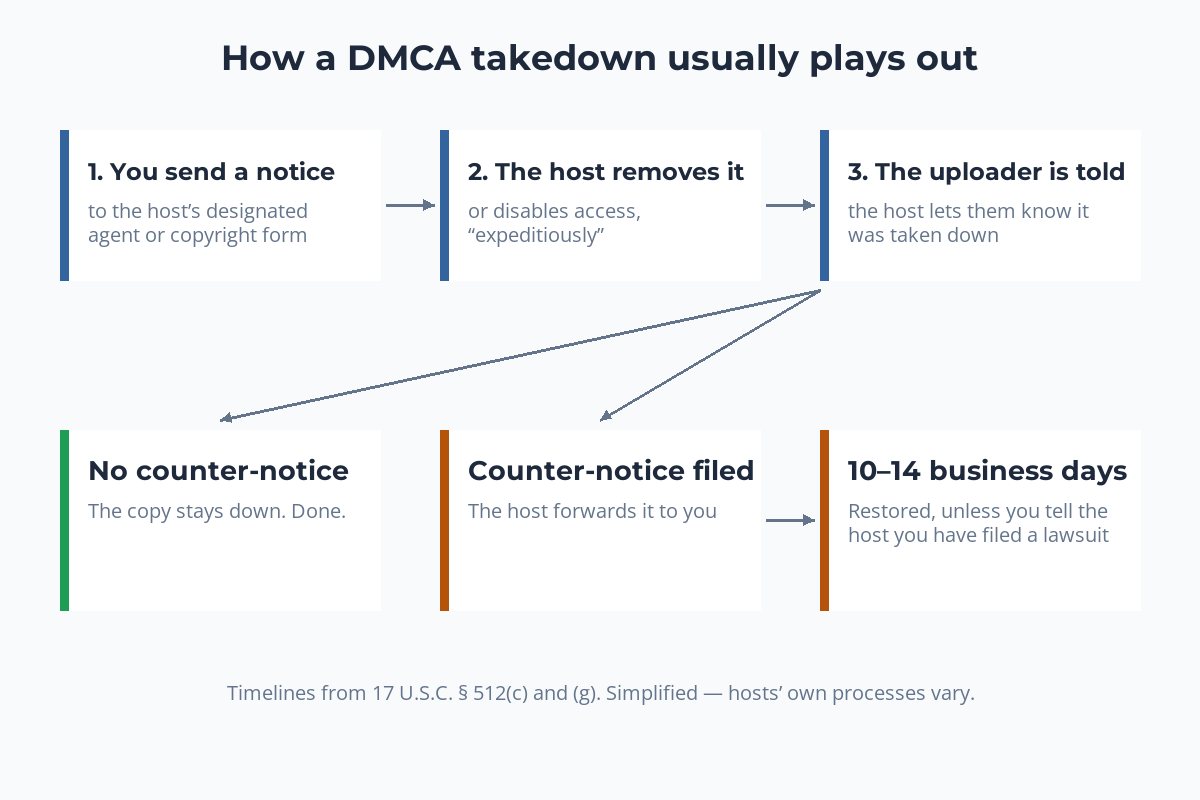
In most cases, the host removes the copy and that is the end of it. The person who posted it is told why, and most people do not argue.
If they believe the removal was a mistake, they can send a counter-notice, also under penalty of perjury (§ 512(g)). The host forwards it to you. The host may then restore the material no less than 10 and no more than 14 business days after receiving the counter-notice — unless you tell the host, within that time, that you have filed a court action to stop the infringement.
That is the point where a takedown becomes a legal dispute. In the US, you generally cannot sue over a US work until it has been registered with the Copyright Office, which can take months. If there is any chance you will need to go further, read should you register copyright on your photos before it happens.
Don't Overreach: False Claims Have Consequences
The DMCA protects both sides. Under § 512(f), anyone who knowingly misrepresents that material is infringing is liable for the damages that causes, including costs and attorney's fees. The same applies to a counter-notice that knowingly misrepresents a mistake.
- Only file for photos whose copyright you own or are authorized to enforce.
- Do not file against uses you licensed, even if the licensee is now doing something you dislike — that is a contract question.
- Do not use a takedown to remove criticism, reviews or news coverage that merely shows your photo; think about fair use first.
- Never file to damage a competitor. It is exactly what § 512(f) is there to punish.
When the DMCA Does Not Apply
The DMCA is US law. It binds service providers that operate under US law, and many international platforms follow it or run a similar process for everyone. A site hosted entirely outside the US, by a company with no US presence, has no obligation to follow it.
Other countries have their own routes. In the European Union, the Digital Services Act requires hosting services to provide a way for anyone to report illegal content, including copyright infringement, and to process those notices. Elsewhere, the relevant route depends on local copyright law. Copyright laws by country compares ten of them.
When no formal process applies, a polite email to the site owner, the host or the payment provider behind a shop still works surprisingly often. For the full set of options, see what to do when someone steals your photos.
Make the Next Takedown Easier
A few habits make every future notice faster to write and harder to dispute:
- Keep your originals. Full-resolution files and RAW files are the clearest proof that the photo is yours.
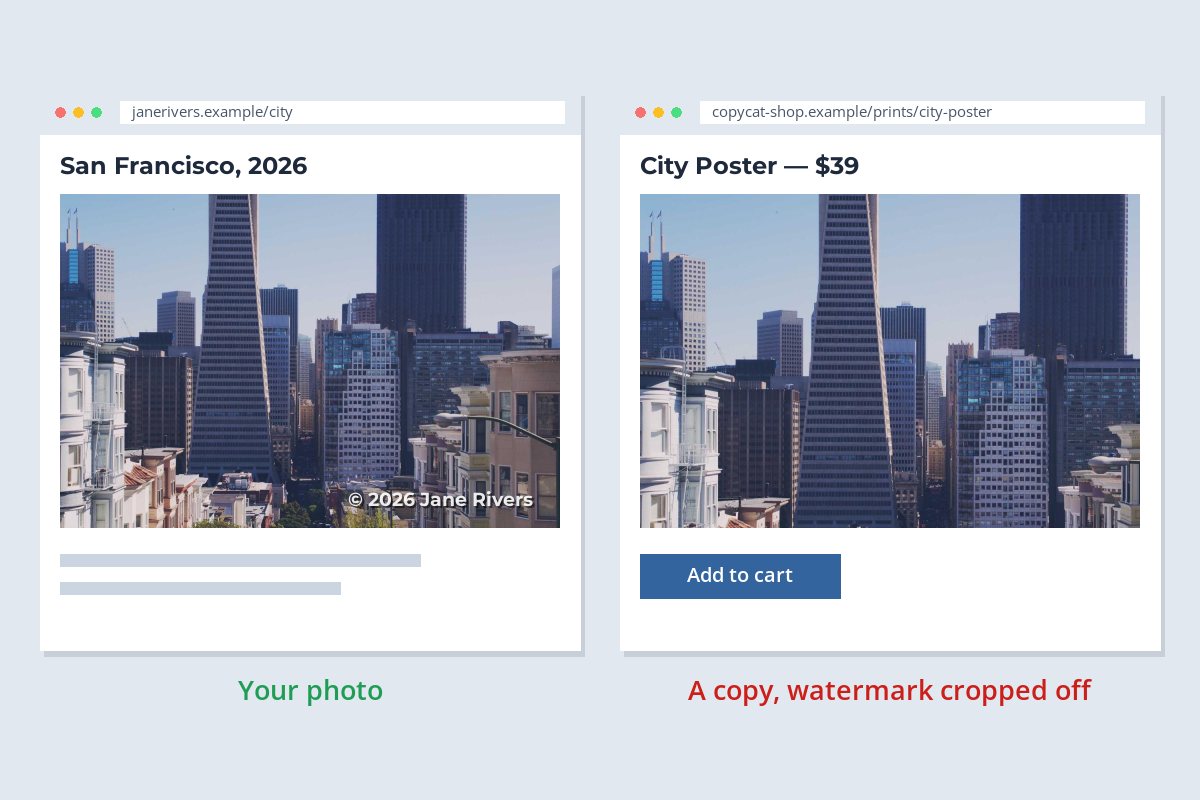
- Watermark what you publish. A visible name or copyright notice on the photo makes ownership obvious to a support team — and a copy with the watermark cropped off is evidence in itself.
- Place the watermark where a crop cannot remove it. See can watermarks be removed? for what makes one hard to strip.
- Save a notice draft. Keep your contact details and the two required statements in a document, so the next notice only needs URLs.
Sample photos: San Francisco by Sebastien Gabriel, Beach by Israel Sundseth on Unsplash.