
On this page
Why Mini Session Proofs Need a Watermark
Holiday minis pack a season of families into a weekend or two. Each family gets a gallery to choose from, and almost every one of them shares something before they order: a sneak peek you sent, a screenshot of the gallery, a favorite dropped into the family group chat.
That is where an unmarked proof turns into a free final. A phone screenshot of a proof is good enough for a Facebook post or a holiday card printed at home. With a watermark, the same screenshot works for you instead: it shows the photo is not the finished file, and it tells every aunt and neighbor who took it. For a mini session business that books on word of mouth, that credit is worth having on every shared copy.
| What you send | Who sees it | Watermark |
|---|---|---|
| Sneak peek (one to three photos) | The family and everyone they share with | Studio name and session, beside the family |
| Proof gallery | The family, while they choose | The same template; add PROOF if you sell by the image |
| Promo for the next minis | Strangers in local groups | Studio name on every sample photo |
| Paid finals | The family | None |
One Template for Every Family
Minis are the same job twenty times over: the same set, the same light, the same edit. The watermark should be the same too, so you build it once and never touch it during the busy weeks.
- Studio name on the first line. The name a parent will search for when they want to book next year. A readable script or clean capitals both work; see the best fonts for watermarks for scripts that survive a phone screen.
- The session as a second, smaller line. "Holiday minis" tells the family which session the photo came from and gives a reposted photo some context. Leave the family’s name off, so one template fits everyone.
- About a fifth of the photo’s width. Big enough to read in a screenshot, small enough to sit beside the family rather than over them. Watermark.ws sizes a mark as a share of each photo’s width, so it comes out the same on every file in the batch.
- White with a soft shadow, at 85–95% opacity. It reads on dark sweaters, white sets and the string lights behind them.
- Beside the family, in the lower half of the frame. A mini set is framed the same way all day, so there is usually floor or backdrop to one side of the family. Keep it inside the frame rather than in a corner, where the family’s crop for a post would cut it off.




In Watermark.ws, save the design as a template called "Holiday minis". Saved templates are part of Premium; on the free plan you can design the mark and try it on a single photo. If you add the year to the second line, next season you change one word and nothing else.
Watermark Twenty Galleries in One Edit
Twenty families with thirty proofs each is 600 photos. Done one gallery at a time, that is an evening; done as one batch, it is a coffee.
-
Export proofs with the family in the file name
For example
ellis-014.jpg. Watermark.ws keeps your file names in the download, so the marked files sort straight back into galleries. Export at proof size, around 2,000 pixels on the long edge; how to watermark client proofs explains why. -
Add the whole weekend to one edit
Premium takes up to 5,000 files per edit, so every gallery goes in together. If you prefer to keep families apart, run one edit per family; with the template it is a few clicks each.
-
Load the template and apply it to all files
Every photo gets the same mark at the same share of its width, in the same place.
-
Scroll through for faces
The template position suits most frames. Where a child leaned in, a family sat off-center or a portrait frame put someone in the lower half, open that photo and drag the mark into empty space. Only that file changes; the rest keep the template’s position.
-
Download and upload to each gallery
Your originals are never changed, so the clean files for the finals are still where you left them.
 Template position
 Moved for this photo
Out of a whole weekend, expect a handful of photos like this one: the family knelt further right than usual, and the template’s spot runs into the older boy’s face. Moving the mark on that one photo takes seconds. For the rest of the routine around big batches, from naming to checking the results, see the batch watermarking workflow.
Sneak Peeks for Stories: Crop and Mark in One Pass
Families love a sneak peek within a day or two, and most of them go straight into Instagram or Facebook Stories. Post a landscape proof to a Story and it either shrinks into a band across the middle of the screen or gets cropped by the parent, usually cutting off your mark with the edges.
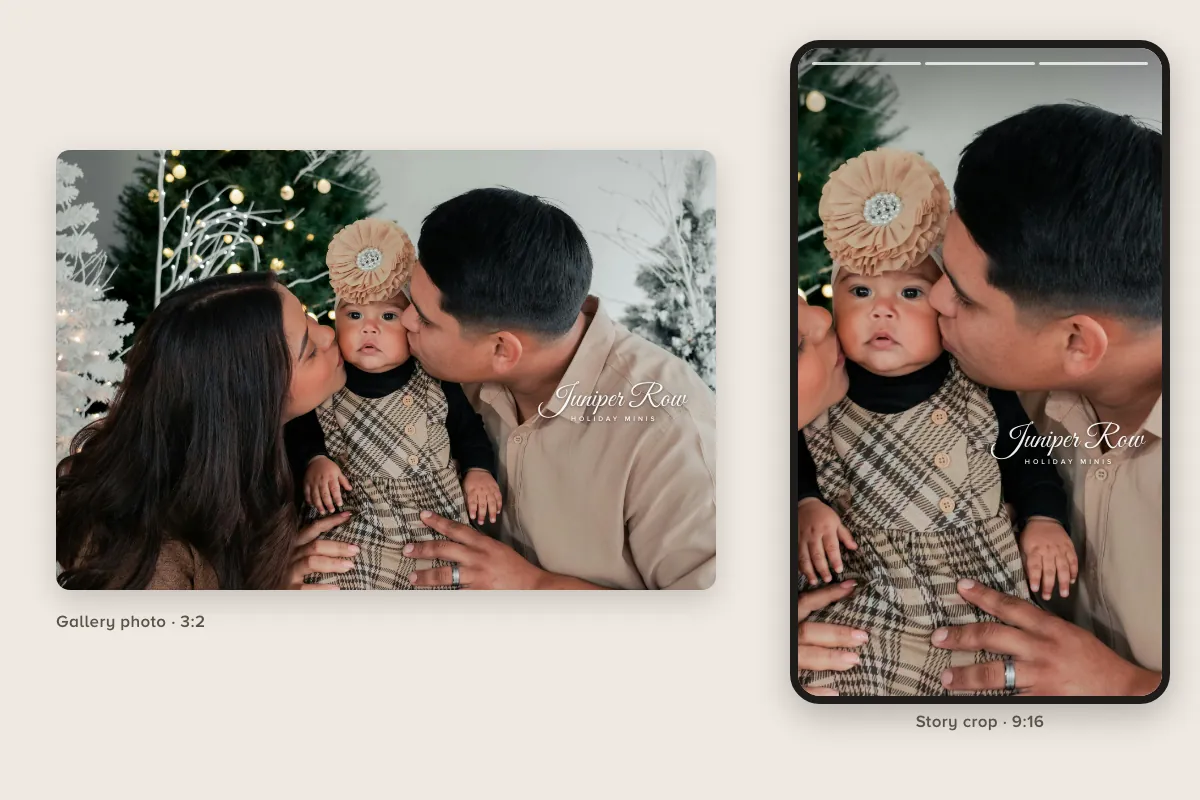
- Crop to 9:16 in the same edit. The Crop tool has a Reel size (1080 × 1920) that fits Stories too, so the crop and the watermark happen in one pass. A tall frame cuts the sides, so check each crop keeps the faces that matter.
- Place the mark for the tall frame. Keep it out of the top 14% and the bottom 35%, where Stories draw the profile name, the reply box and stickers.
- Make it larger than on the gallery photo. On a 9:16 frame, around 40–50% of the width reads clearly on a phone.
- Save it as a second template, "Minis sneak peek", so the crop and the mark always come together.
Why one template does not fit every shape, and where the safe zone sits on each, is covered in one watermark for every crop.
Deliver the Finals Clean, and Tell Parents Why
Once a family has paid, their finals are theirs: full size and without a watermark. They will print them, put them on cards and frame them for the grandparents. A mark on paid finals reads as distrust and spoils the prints. If you want credit when they post, ask for a tag instead.
Most frustration about watermarks comes from parents not knowing what is coming. Say it once, plainly, in the booking confirmation and again in the gallery email:
- The proofs are for choosing. They carry the studio mark so the family can share favorites while they decide.
- The finals arrive clean and full size. Give the date, so nobody prints a screenshot for their cards in the meantime.
- Screenshots make poor prints. A proof is sized for screens and falls apart on paper; the finals will look far better.
- A tag is welcome. If they post the finals, tagging the studio is how friends find you.
"Your proofs carry our watermark so you can share your favorites while you choose. Your finals arrive clean and full size by 12 December; those are the ones to print. If you post them, we would love a tag!"
Sessions with babies and young children come with a few extra considerations, from sneak peeks to privacy, covered in watermarks for newborn and family photographers.
Marketing the Minis: Mark the Promo Photo Too
The promo graphic for your minis travels further than any gallery. It gets posted in local parents’ groups, school chats and neighborhood pages, often as a screenshot without your caption, and sometimes cropped down to just the picture.

- Put the same watermark on the sample photo. The text panel says who you are, but people crop and repost the cutest photo on its own.
- Keep the details in the text, not on the photo. Date, price and booking link change; the photo and its mark can be reused next year.
- Use last season’s photos with permission. A family who agreed to portfolio use is not necessarily happy to be in your ads; ask, and keep the answer on file.
More on watermarks across a photography business, from portfolios to proofs, is on the photographers page.
Give them a year of Premium: one template for every family, and twenty galleries watermarked in one edit. Emailed on the day you choose, with a card to print. Nothing renews.
Gift a year, from $48.00Holiday Minis Watermark Checklist
- Build one template before the first session: studio name plus "Holiday minis".
- Place it beside the family, inside the frame, in the lower half.
- Watermark every gallery in one edit, then fix the few photos where it meets a face.
- Crop sneak peeks to 9:16 and mark them for the tall frame.
- Tell parents the proofs are marked and when the clean finals arrive.
- Put any part of the mark across a face.
- Leave the mark in a corner, where a crop for a post removes it.
- Add the family’s name to the template.
- Watermark the finals a family has paid for.
- Post the promo graphic with an unmarked sample photo.
Sample photos: Family on a snow set by Jennifer Kalenberg, Parents and baby by Melanie Rosillo Galvan, Brothers in a wagon by Hannah Skelly, Family by the tree by Dmitry Rodionov, Girl with cocoa by Dmitry Rodionov, Family by a lake by Gabriel Tovar, Children in an armchair by Patrick Brito on Unsplash.