On this page
Glaze vs Nightshade: The Short Answer
Glaze and Nightshade are free tools from the SAND Lab at the University of Chicago. Each makes small changes to an image that are meant to be hard for people to notice but that change how AI models read it. The difference is what they aim at. Glaze protects your style from being copied. Nightshade tries to damage models that train on images without permission.
- Glaze is defensive. It makes a model fine-tuned on your art learn a different style, so prompts for "your style" produce something else.
- Nightshade is offensive. It turns an image into a "poison" sample that teaches a model the wrong concept, working best when many artists use it.
- Use Glaze if you worry about style mimicry. Its makers recommend it on every piece you post, and Nightshade as an optional extra.
- Neither is permanent. Both teams say future techniques may get around them, and researchers have published attacks.
- Neither replaces a watermark. They act on models; a visible watermark acts on people.
What Glaze Does
Glaze was released in March 2023 to fight style mimicry: someone collects a particular artist’s work and fine-tunes an image model on it, so it can produce endless pictures "in the style of" that artist. In the project’s words, Glaze computes "a set of minimal changes to artworks, such that it appears unchanged to human eyes, but appears to AI models like a dramatically different art style." A realistic charcoal portrait might read to the model as abstract expressionism.
- Each image gets its own cloak. The changes are computed per artwork, which is why they are hard to find and undo.
- You choose the intensity. Higher intensity gives stronger protection and more visible changes.
- Two ways to run it. A free desktop app, and WebGlaze, an invite-only web version that the lab offers free to human artists who do not use generative AI.
- It is not open source. The team says that is deliberate, to make adaptive attacks harder.
The project is clear about what Glaze is not for. It is designed against individual mimicry through fine-tuning, and the team says it is "less or not effective" when someone imitates a style that is already built into base models, such as impressionism or popular anime looks. Its FAQ also says it does not believe Glaze gives consistent protection against image-to-image tools, including style transfer and inpainting.
What Nightshade Does
Nightshade, released in January 2024, is built the same way but aims at the training process itself. It changes an image so that a model sees a different subject than the one shown. The project’s example: people see a cow in a field, but the model sees a leather purse in the grass. Train on enough of those, and the model starts giving cows handles and zippers.
Its stated goal is economic rather than destructive: "not to break models, but to increase the cost of training on unlicensed data, such that licensing images from their creators becomes a viable alternative." That only works at scale, which is why the team describes it as something artists use as a group.
- It does not protect your style. The team warns: "Do not post shaded images of your art if you are at all concerned about style mimicry" unless they are also glazed.
- Low intensity is fine. Because its effect is on models, not on you, a low setting keeps the image looking its best.
- It runs locally. Nightshade 1.1, released in April 2026, is a free app for Windows and Mac.
Glaze vs Nightshade Side by Side
| Glaze | Nightshade | |
|---|---|---|
| Role | Defensive | Offensive |
| Protects against | Style mimicry by fine-tuning on your work | Unlicensed training on scraped images, as a deterrent |
| Who benefits | You, on each image you glaze | Artists collectively, as more poisoned images circulate |
| Effect on a model | Learns a different style for your work | Learns the wrong concept for what the image shows |
| Use it on | Every piece you post, per its makers | Optionally, alongside Glaze |
| Visible changes | More visible on flat colors and smooth backgrounds | Same, with a low-intensity option |
| How to get it | Desktop app or invite-only WebGlaze | Desktop app for Windows and Mac |
| Cost | Free | Free |
The team’s own advice is that artists should ideally use both: Glaze on everything for personal protection, and Nightshade on top if they want to push back against scraping. The Nightshade page says the team is working on a combined release.
The Honest Limits
Both projects are unusually frank about their limits. Glaze’s page says it "is not a permanent solution against AI mimicry" and that "it is always possible for techniques we use today to be overcome by a future algorithm." Nightshade’s says it "is unlikely to stay future proof over long periods of time."
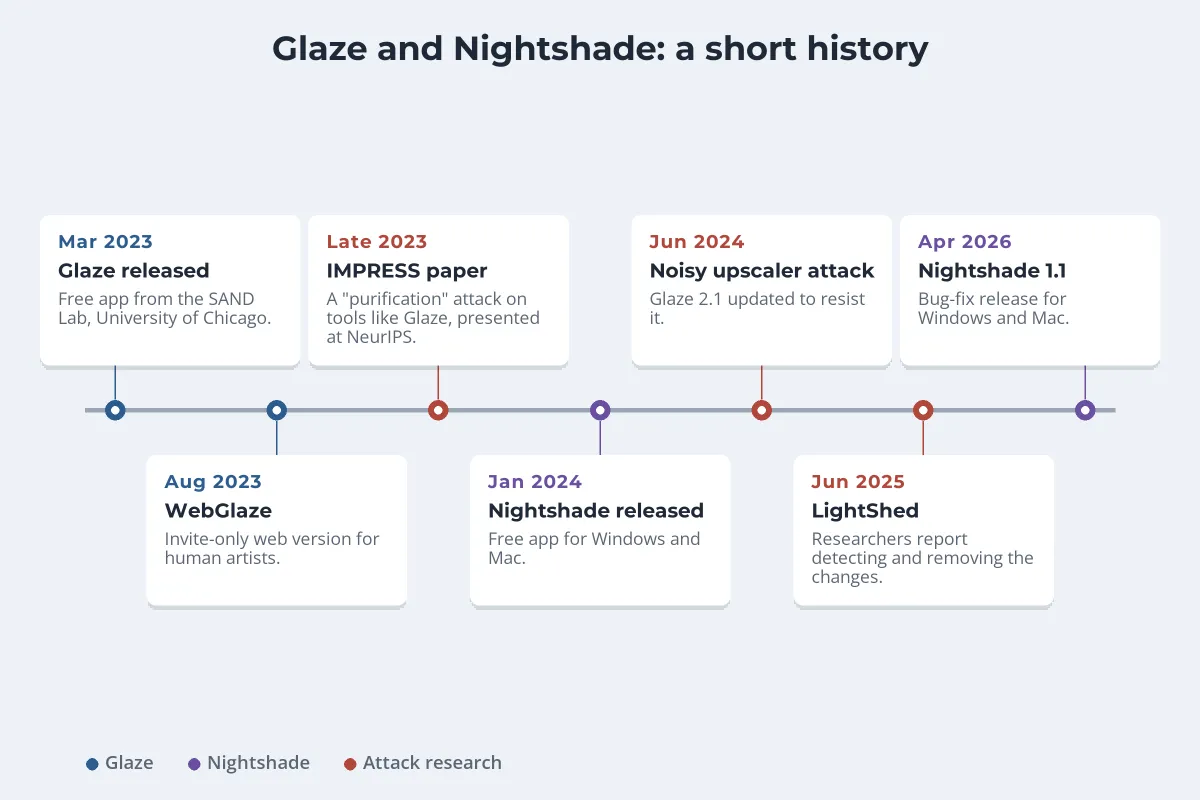
- Published attacks exist. The Glaze team lists two known attacks: IMPRESS, presented at NeurIPS in late 2023, and a "noisy upscaler" attack made public in June 2024, after which it updated Glaze to version 2.1 to resist it.
- Newer research goes further. In 2025, researchers from the University of Cambridge, TU Darmstadt and the University of Texas at San Antonio presented LightShed at the USENIX Security Symposium. They reported detecting Nightshade-protected images with 99.98% accuracy and removing the protection, and said they hoped it would push the development of better tools.
- The makers dispute "broken" claims. Glaze’s FAQ argues that many reported bypasses misunderstood the attack it defends against, and the team updates the tools as attacks appear.
- It cannot reach back in time. Work that was scraped before you started glazing has already been collected.
- It costs some image quality. Changes can show, especially on flat colors and smooth backgrounds.
The fair reading is that both tools raise the cost of misusing your work, today, against today’s methods. They are worth using if those costs matter to you, but they are not a guarantee, and a protected image is not a safe image to post at full resolution.
How They Compare With Watermarks and Opt-Outs
Glaze and Nightshade are one of several kinds of protection, and each kind acts on something different. It helps to know which problem each one solves before you rely on it.
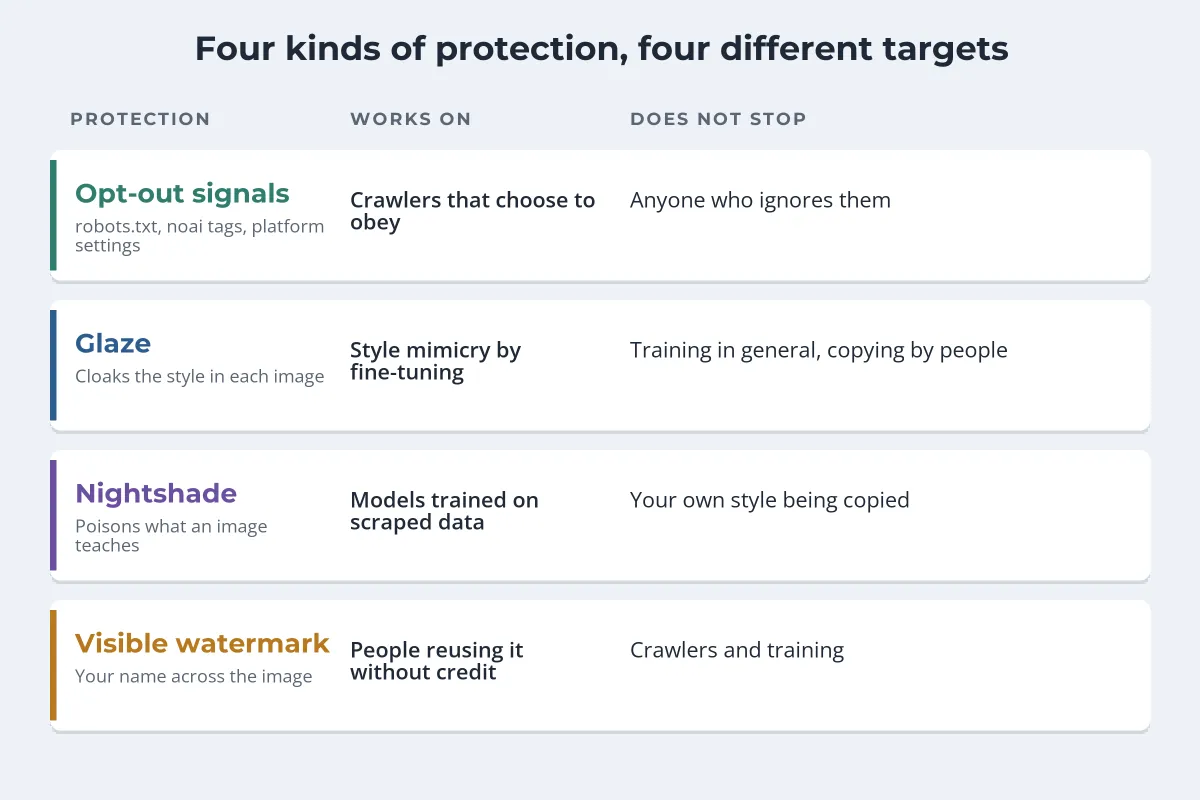
- Opt-outs such as robots.txt rules and "noai" tags ask crawlers not to collect your work. They only bind crawlers that choose to obey, but they cost nothing and put your wishes on record.
- A visible watermark does nothing to a model, but it credits you when the image is reposted, makes it a less attractive picture to take by hand, and shows it is not free to use. For watermarks that resist removal, see how to make a watermark hard for AI to remove.
- AI labels are a different thing again. Generators mark their own output with tools such as SynthID and Content Credentials, explained in how AI image generators mark their pictures. None of that protects human-made art.
For the full set of steps, from robots.txt rules to the terms on your website, see how to protect your art from AI training.
Using Glaze, Nightshade and a Watermark Together
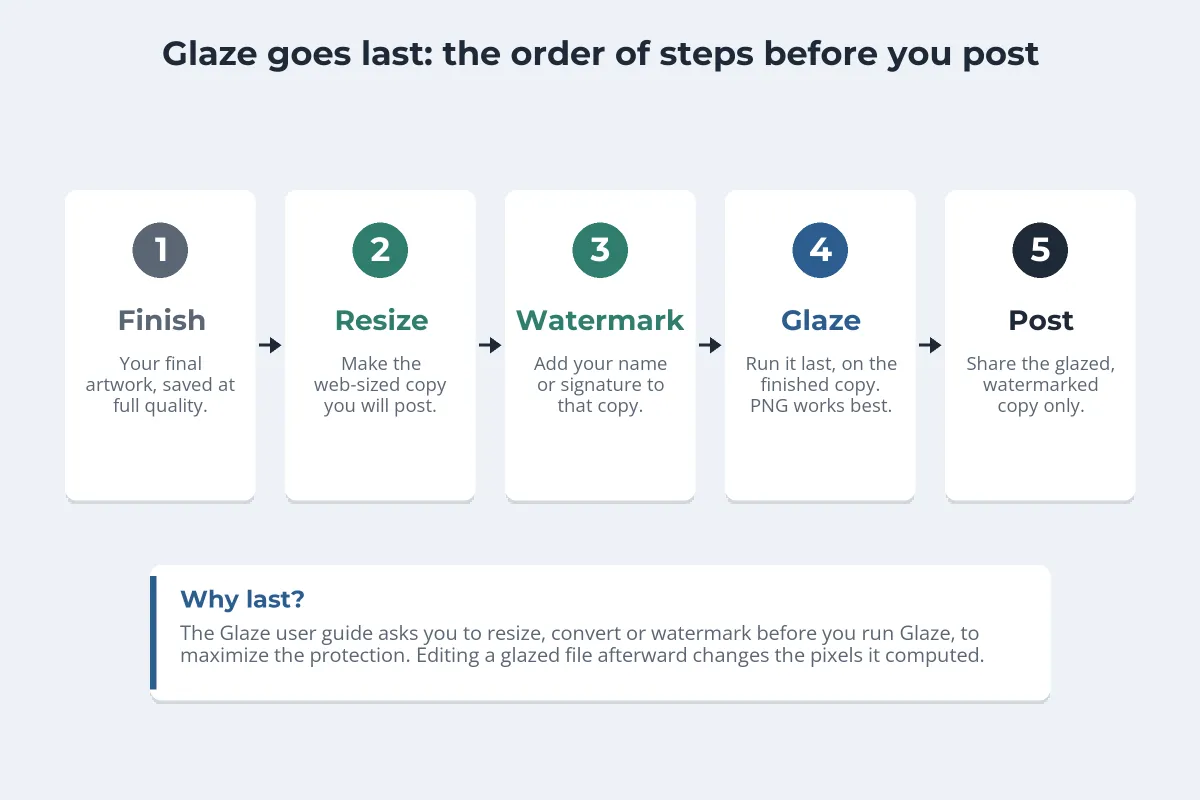
The order matters. The Glaze user guide says to run Glaze "as the last step before you post your artwork online," and to do any resizing, format conversion or watermarking before it, to maximize the protection.
-
Keep the original private
Your full-resolution file stays on your computer. You only post copies.
-
Make a web-sized copy
A smaller image is less useful to anyone who takes it. See resizing before sharing online.
-
Add your watermark
A signature or name that crosses part of the artwork, not just a corner. Save it as a template so every piece matches.
-
Run Glaze, and Nightshade if you choose
Use PNG files for the best results, as the Glaze FAQ suggests, then compress the result if you need to.
-
Post only the finished copy
Do not edit or re-export it afterward, so the cloak stays as computed. The same order works for commission previews and works in progress.
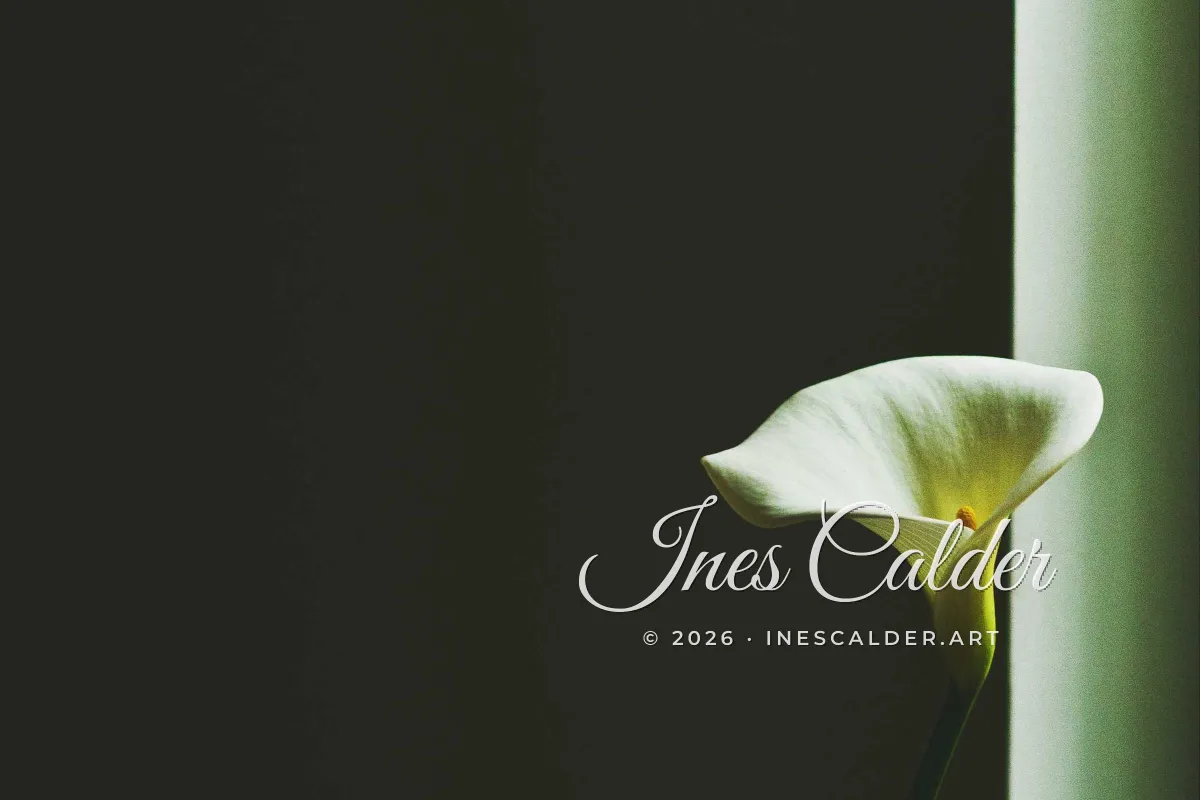
Watermark.ws covers the resize and watermark steps in one pass for a whole batch, and saves the result as a new file without changing your original, so the glazing step can come straight after.
Sample photos: Succulents by Jeff Sheldon, Calla lily by Marta Pawlik on Unsplash.