On this page
- How to Report Stolen Videos: The Short Answer
- Before You Report: Check, Then Capture
- Reporting a Stolen Video on YouTube
- Let YouTube Find the Copies: Copyright Match Tool and Content ID
- Reporting a Stolen Video on TikTok
- When the Uploader Files a Counter-Notification
- Watermark Videos So Re-uploads Still Credit You
How to Report Stolen Videos: The Short Answer
To report stolen videos on TikTok and YouTube, you file a copyright removal request on each platform. Both run a notice-and-takedown process modeled on the US DMCA, both accept reports from copyright owners and their authorized representatives, and both let the uploader dispute the removal.
- YouTube: submit a copyright removal request from YouTube Studio or the copyright complaint webform. You can choose a 7-day scheduled removal, and ask YouTube to prevent future copies.
- TikTok: file a Copyright Infringement Report through TikTok’s online form or in the app. The online form also lets you ask TikTok to stop the same video re-appearing.
- Find copies automatically: once a YouTube removal request is approved, the Copyright Match Tool scans new uploads for full re-uploads of that video.
- Expect disputes sometimes. A counter-notification forwards the uploader’s contact details to you; on YouTube you then have 10 US business days to show legal action.
Before You Report: Check, Then Capture
A removal request is a legal statement, and both platforms warn that knowingly false reports can create liability for damages under section 512(f) of the DMCA. Two quick checks first:
- Is it really yours to report? Footage you shot is usually yours. A video you made under contract for a client, or as part of your job, may belong to them.
- Is it really a copy? Reactions, commentary, reviews and short quotes can be fair use in the US, and the EU and UK have their own exceptions for quotation, criticism, review and parody. A full re-upload with nothing added is rarely any of those.
Then capture each copy before it changes: the URL of the video, the channel or account name, the view count and date, and a screen recording if the account looks likely to delete it. Keep your original file and the link to your first upload, because being first matters for the tools below.
TikTok’s policy, like Meta’s, encourages you to contact the uploader first for a quick resolution. That can work for a fan who did not know better. For an account that re-uploads other people’s videos for views, go straight to the report.
Reporting a Stolen Video on YouTube
YouTube offers several routes: YouTube Studio for videos, and the copyright complaint webform, email, fax or post for videos and other content. Studio and the webform are the quickest.
-
Open the removal request
In YouTube Studio, open the copyright section in the left-hand menu (YouTube’s help currently calls it Content detection) and select New removal request. Or use the copyright complaint webform linked from YouTube’s copyright help.
-
Add the infringing links
The URL of each video, Short or other content that copies yours.
-
Describe your work
What the original is and where it was published, ideally with a link to your upload.
-
Choose when it takes effect
Standard removal, or scheduled removal, which gives the uploader 7 days to delete the video before YouTube removes it and applies a strike.
-
Prevent copies, then sign
In Studio you can ask YouTube to stop future copies of the same content being uploaded. Confirm the two legal statements and sign with your full legal name, not a company name.
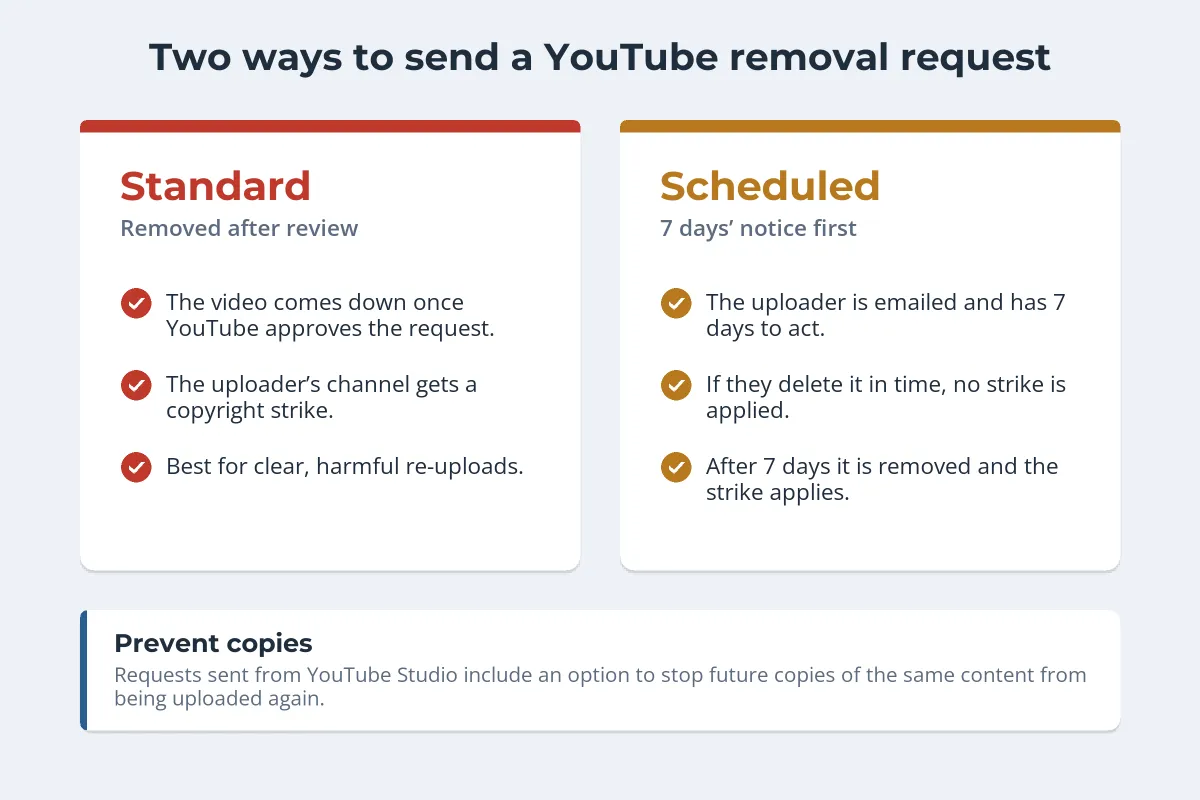
An approved request removes the video and gives the channel a copyright strike. Strikes expire after 90 days once the uploader completes YouTube’s Copyright School, but a channel with three active strikes is subject to termination, along with any associated channels. That is why scheduled removal exists: for a well-meaning uploader, it fixes the problem without the penalty.
Let YouTube Find the Copies: Copyright Match Tool and Content ID
Searching for re-uploads by hand does not scale. YouTube has two automated tools, and most creators qualify for the first one.
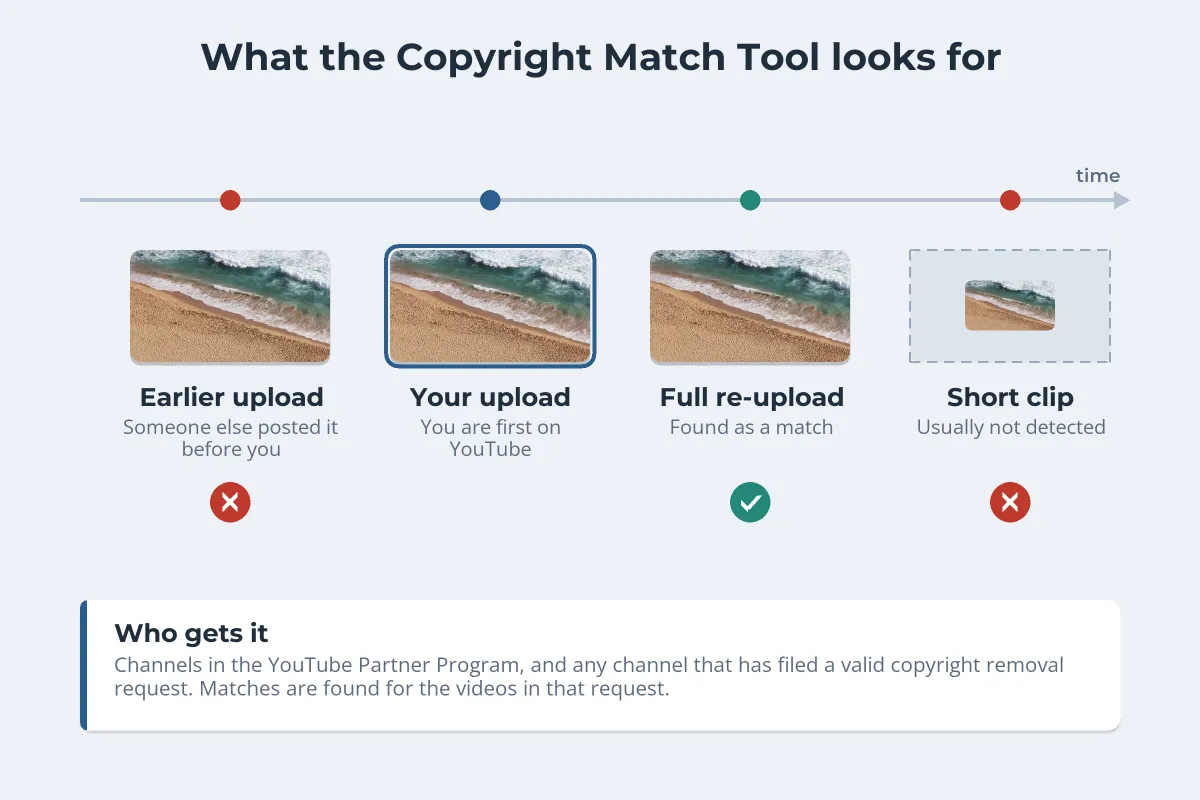
- Copyright Match Tool. YouTube says it is available to any channel that has filed a valid copyright removal request, and to YouTube Partner Program channels in Studio. After a request is approved, it scans new uploads for full or nearly full matches of the videos in it, and can catch some where the audio was replaced or dubbed. You can archive a match, request removal or contact the channel.
- Content ID. YouTube’s fingerprinting system for copyright owners it approves based on their content and demonstrated need. Reference files must be content you hold exclusive rights to, so compilations, gameplay and licensed footage without exclusivity generally do not qualify. Most independent creators use the Copyright Match Tool instead.
The Copyright Match Tool only scans videos uploaded after yours, so it matters that you are the first to upload the content to YouTube. If someone uploaded your video to YouTube before you did, the tool will not scan for it, so report that upload directly.
Reporting a Stolen Video on TikTok
TikTok accepts a Copyright Infringement Report through its online form at tiktok.com/legal/report/Copyright or from inside the app, where a video’s report options include intellectual property. The online form is the better route for most cases:
- It handles several links. Paste the URL of each video that copies yours, plus a link to your original.
- It can stop re-uploads. TikTok says that when you report through the online form you can ask it to prevent future copies, and where it removes the video it will use its best efforts to stop the same video re-appearing.
- It needs to be complete. TikTok says incomplete reports may be denied, and it may contact you with questions.
TikTok may tell the uploader about your report, including the name of the copyright owner. Removed content is deleted after a period, after which it cannot be reinstated. Under its repeat infringer policy, TikTok bans accounts that repeatedly infringe in appropriate circumstances, and can ban immediately for severe violations.
When the Uploader Files a Counter-Notification
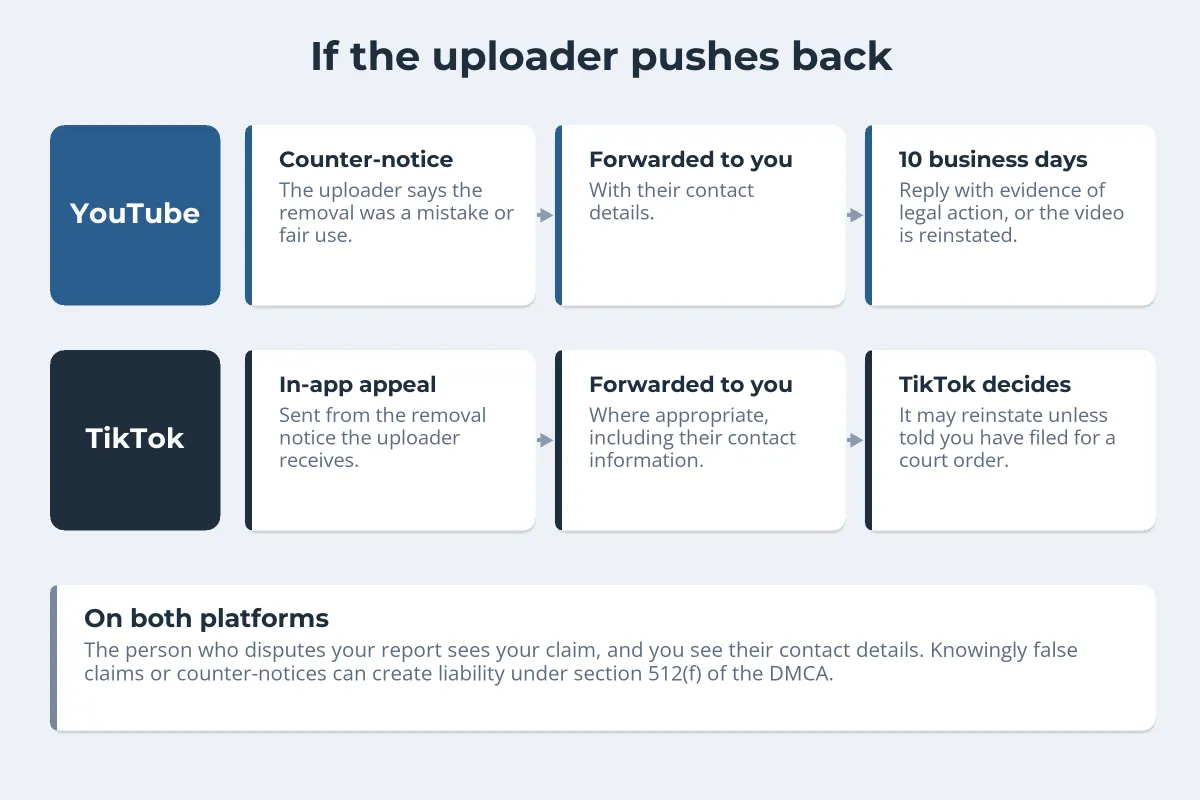
On YouTube, an uploader who believes the removal was a mistake or a fair use can file a counter-notification. If it is valid, YouTube forwards it to you, and you have 10 US business days to respond with evidence that you have taken legal action to keep the video down. Otherwise the video is reinstated, unless the uploader deleted it.
On TikTok, the uploader appeals in the app, from the removal notice. Where appropriate, TikTok forwards the whole appeal to you, including their contact information. It may reinstate the video unless it hears that you have filed an action seeking a court order, and it says reinstatement is at its sole discretion. In the EU, users can also rely on exceptions such as quotation, criticism, review and parody.
A counter-notification is where a takedown becomes a legal dispute, so this is the point to talk to a lawyer if the video matters. The same notice-and-takedown pattern applies on Meta’s platforms; see how to report copyright infringement on Facebook for Facebook, how to report stolen photos on Instagram for Instagram Reels, and how to file a DMCA takedown notice for copies on websites.
Watermark Videos So Re-uploads Still Credit You
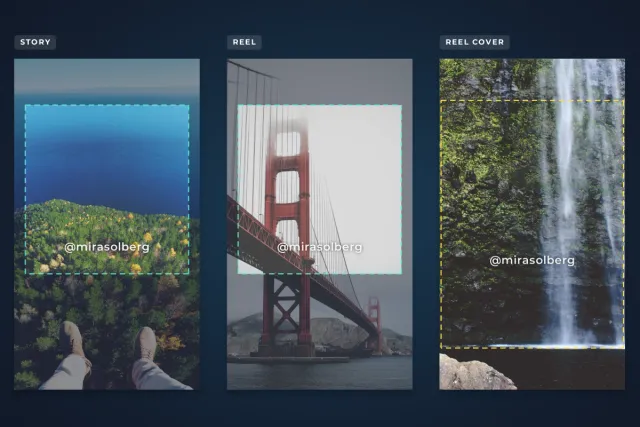
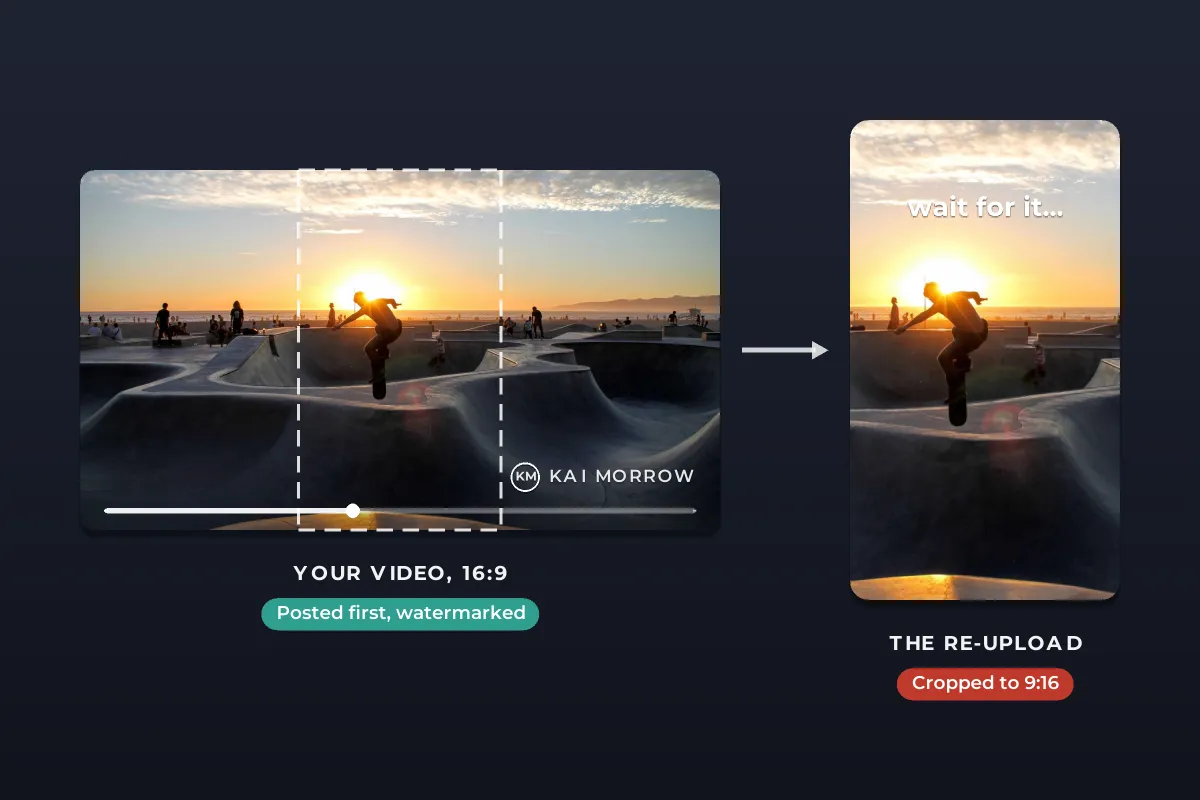
Re-uploaders often crop a horizontal video to 9:16 for TikTok and Shorts, and a corner watermark is the first thing to go. Place your watermark where a vertical crop keeps it: inside the central third of the frame, above the lower area where captions and buttons sit.
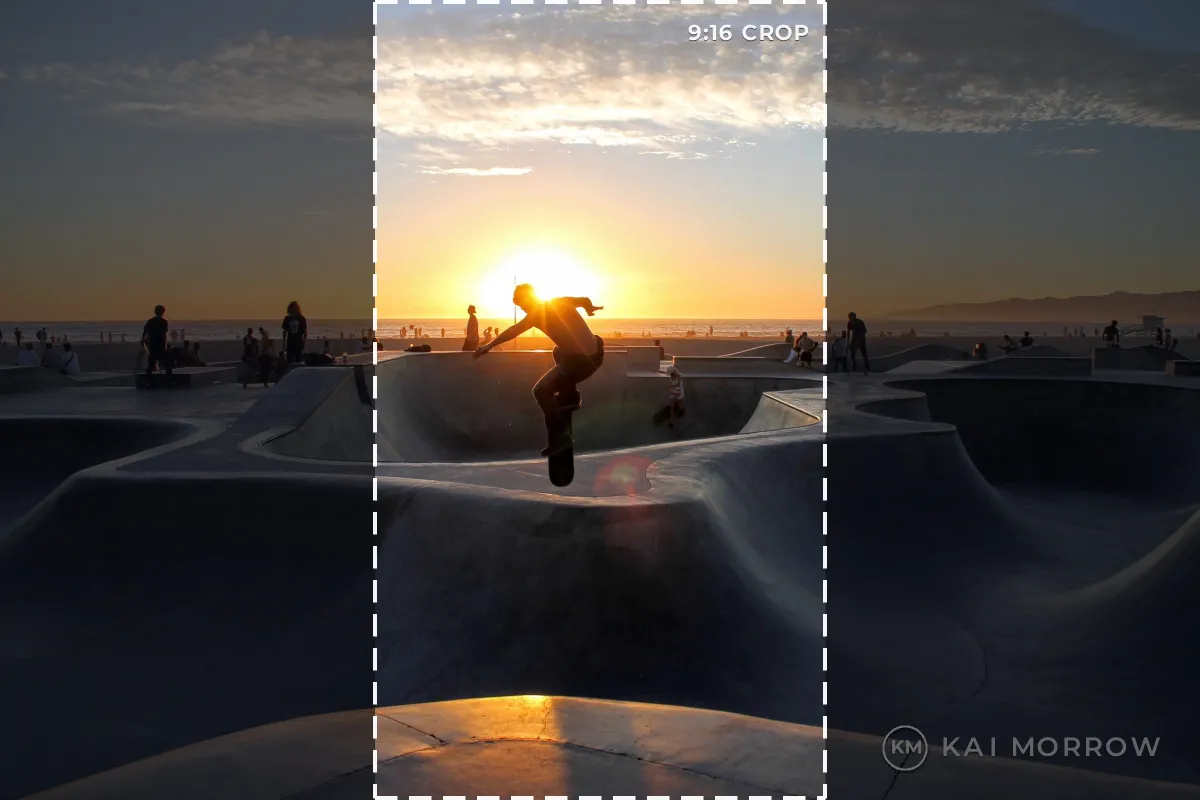 Corner: lost in a 9:16 crop
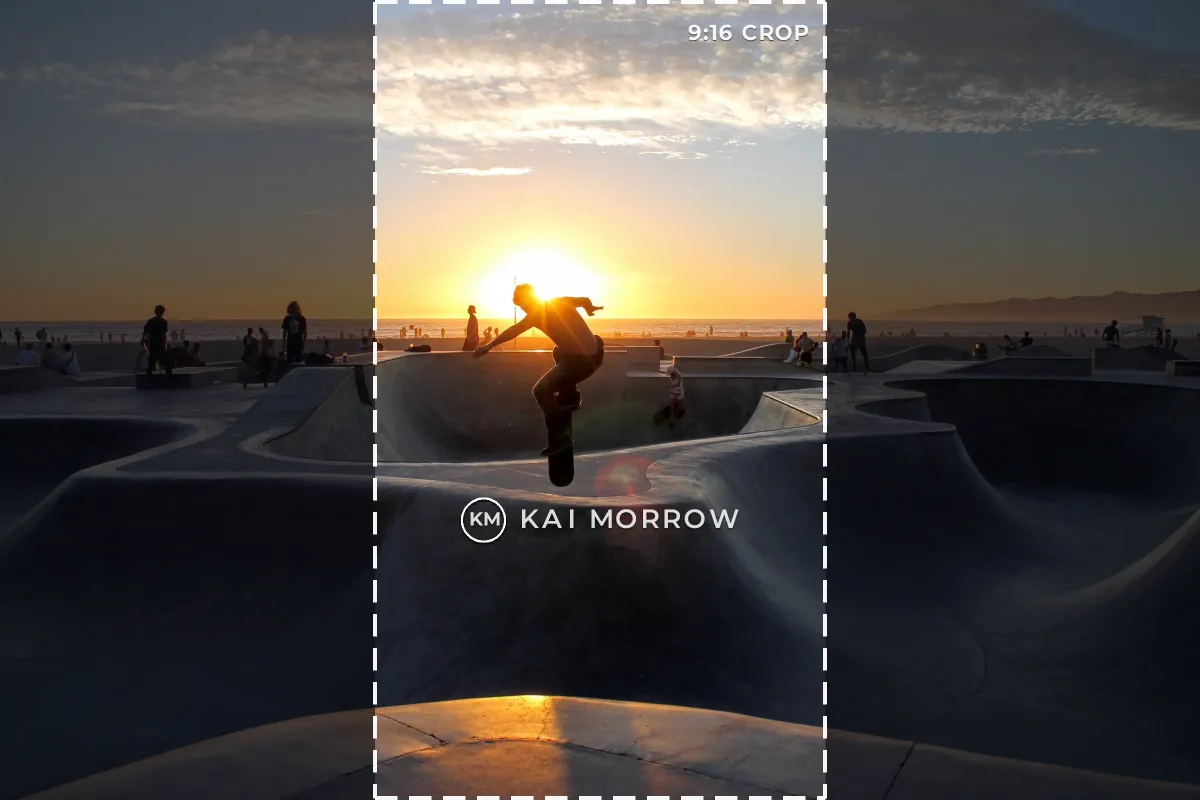 Center: survives the crop
- Keep it semi-transparent so a centered watermark does not fight the action.
- Use your handle or a simple logo, so viewers of a copy can find the original.
- Watermark the whole video, not just the opening seconds; re-uploaders trim intros.
Watermark.ws adds text and logo watermarks to videos in your browser, with the same position, opacity and template on every clip. For placement and timing in detail, see watermarking YouTube and TikTok videos and the guide to watermarking videos online.
Sample photos: Skate park at sunset by Matteo Paganelli, Aerial beach by Sarah Bürvenich on Unsplash.